Construction programmes in your browser
Build the programme, link it and see the critical path straight away - or open the P6 or MS Project file you were sent. Type it in like a spreadsheet, drag the bars, check the logic, then update progress, compare baselines and assess a delay for an extension of time. Line of balance for housing, time-chainage for roads, resources, cash flow and A1 printing, in your browser and for a fraction of the price of the big planning packages.
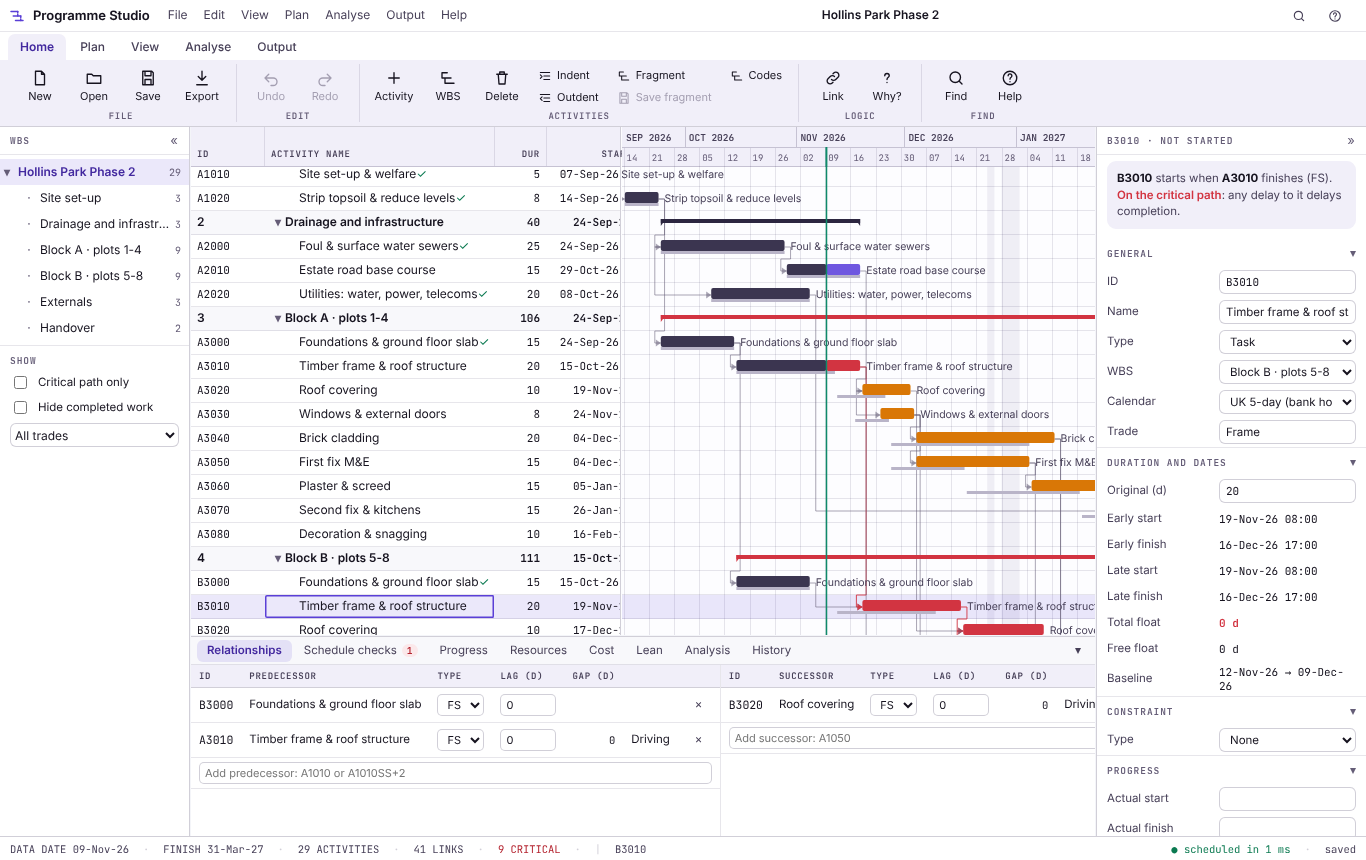
A forward and backward pass on each activity's own calendar, with finish-to-start, start-to-start, finish-to-finish and start-to-finish links, lags in days or per cent, constraints, retained logic or progress override, total and free float and the longest path. Checked against the dates P6 and MS Project saved in their own files.
Primavera P6 .xer and P6 XML, MS Project XML and .mpx, Excel and CSV, GanttProject and IFC 4.3 schedules. Calendars, WBS, activity codes, user fields, resources and progress come across from P6 and MS Project. MS Project .mpp, Asta and Synchro files convert on our server, only if you agree, and nothing is kept.
Names, durations such as 5, 2w or 16h, and predecessors such as A1010 or A1010SS+2 straight into the table. Insert adds the next activity already linked, and you can paste a block of activities from Excel.
Move a bar, stretch it to change the duration, or drag from one bar to another to link them. The critical path in red, near-critical in amber, baseline bars, progress, the data date and bars coloured by trade, WBS or any code.
Select an activity to see what drives it: the predecessor, a constraint, the calendar or progress. Schedule checks list open ends, loops, hard constraints, leads, long lags and out-of-sequence work as you go, most with a one-click fix.
A Monday to Friday calendar with the bank holidays for England and Wales, Scotland or Northern Ireland and a Christmas shutdown. Add your own calendars with any working days and hours, such as six-day weeks, 24/7 work or nights, and your own shutdowns.
The logic as a network diagram, a month calendar of the work, and who is on site each day. Group, filter and colour by WBS, trade, location or any activity code, and filter to the critical path or the work still to do.
A4 and A3 PDF and PNG with a title block, revision and checked-by, fitted to the width or one page. Programmes save as .m2prog files on your computer: nothing is uploaded, and no account is needed for the free version.
The Hollins Park sample: eight homes in two blocks, progressed to the data date with a baseline, resources and costs. Six templates start you off: housing, office fit-out, M&E, highways, small works and refurbishment.
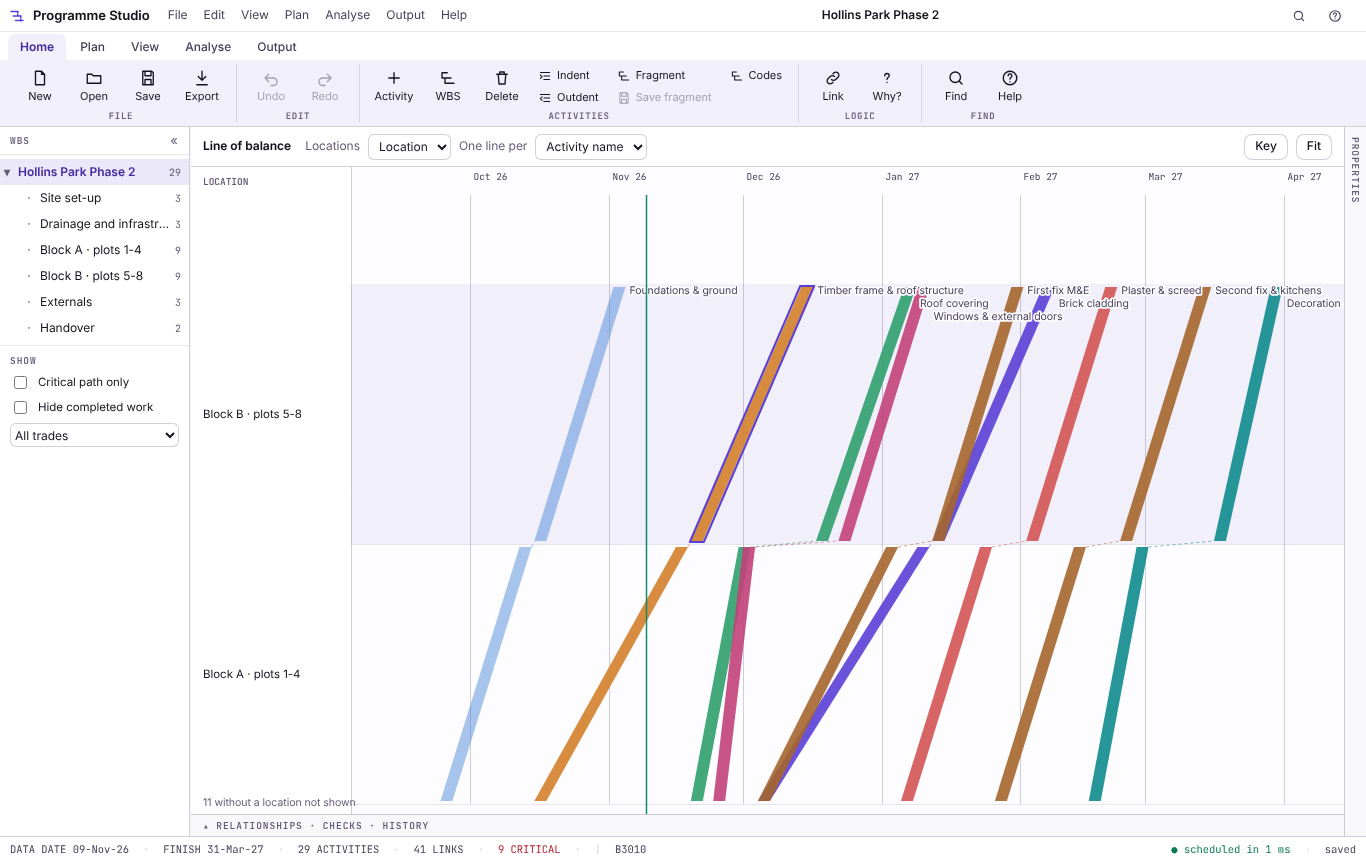
Line of balance for housing
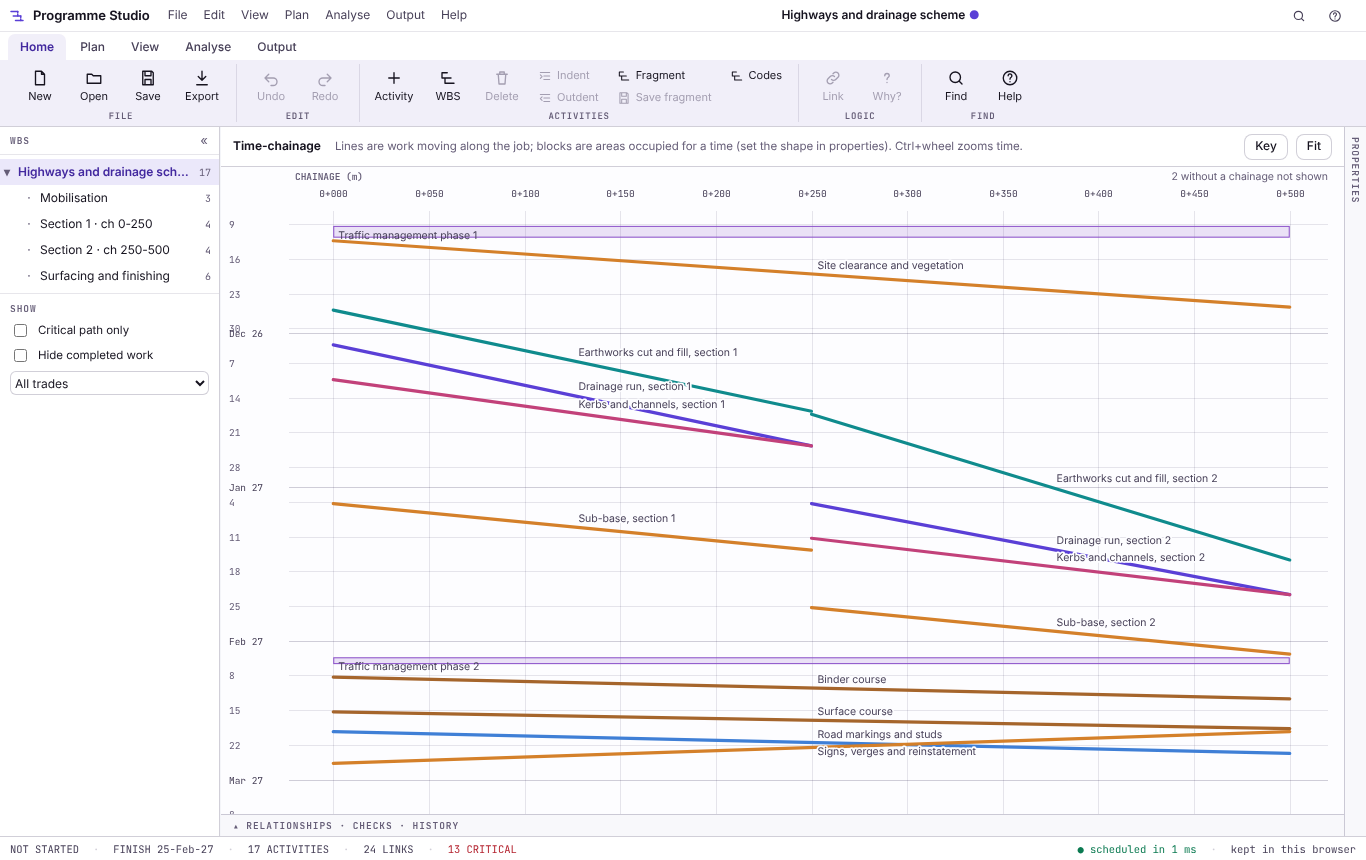
Time-chainage for roads and pipelines
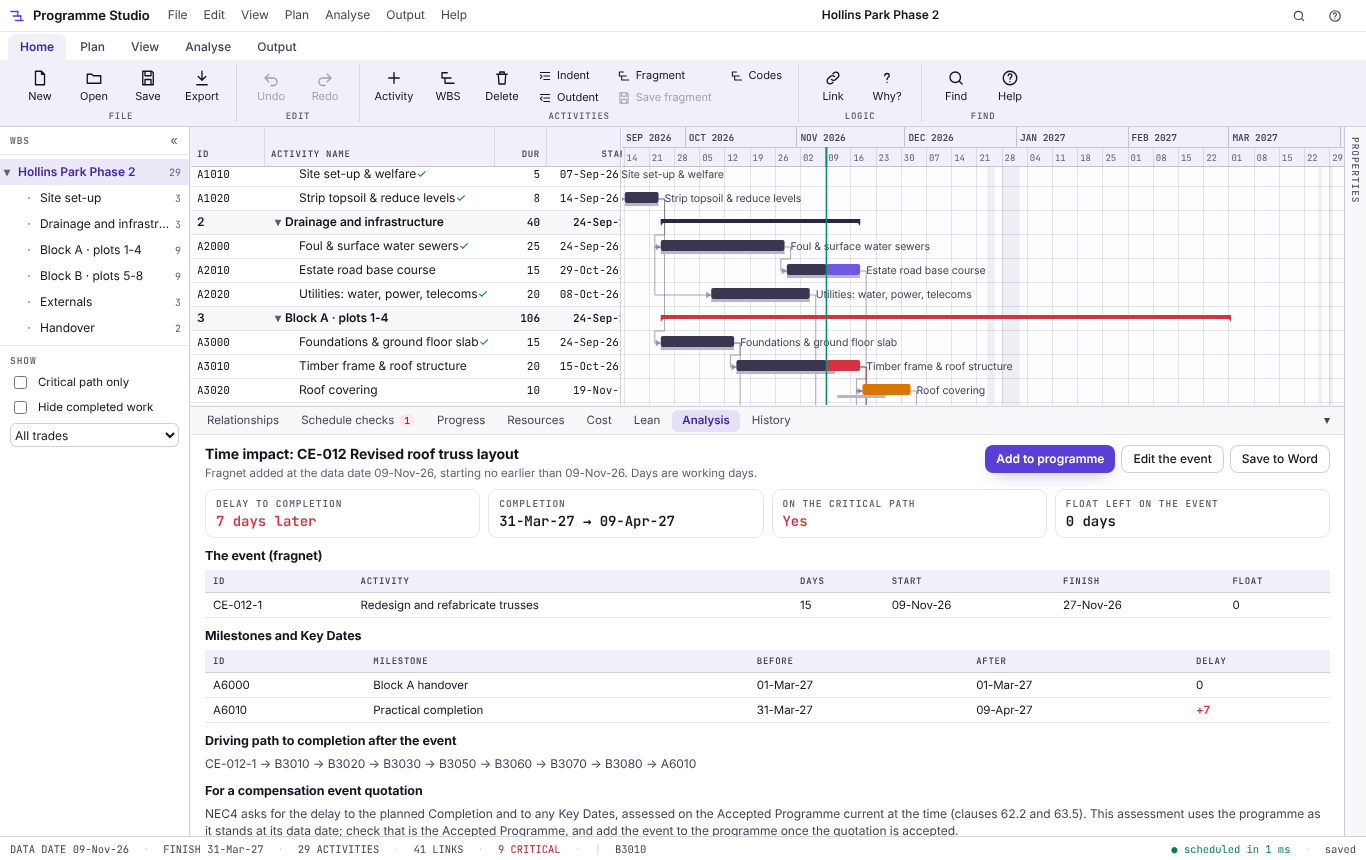
Time impact analysis for a compensation event
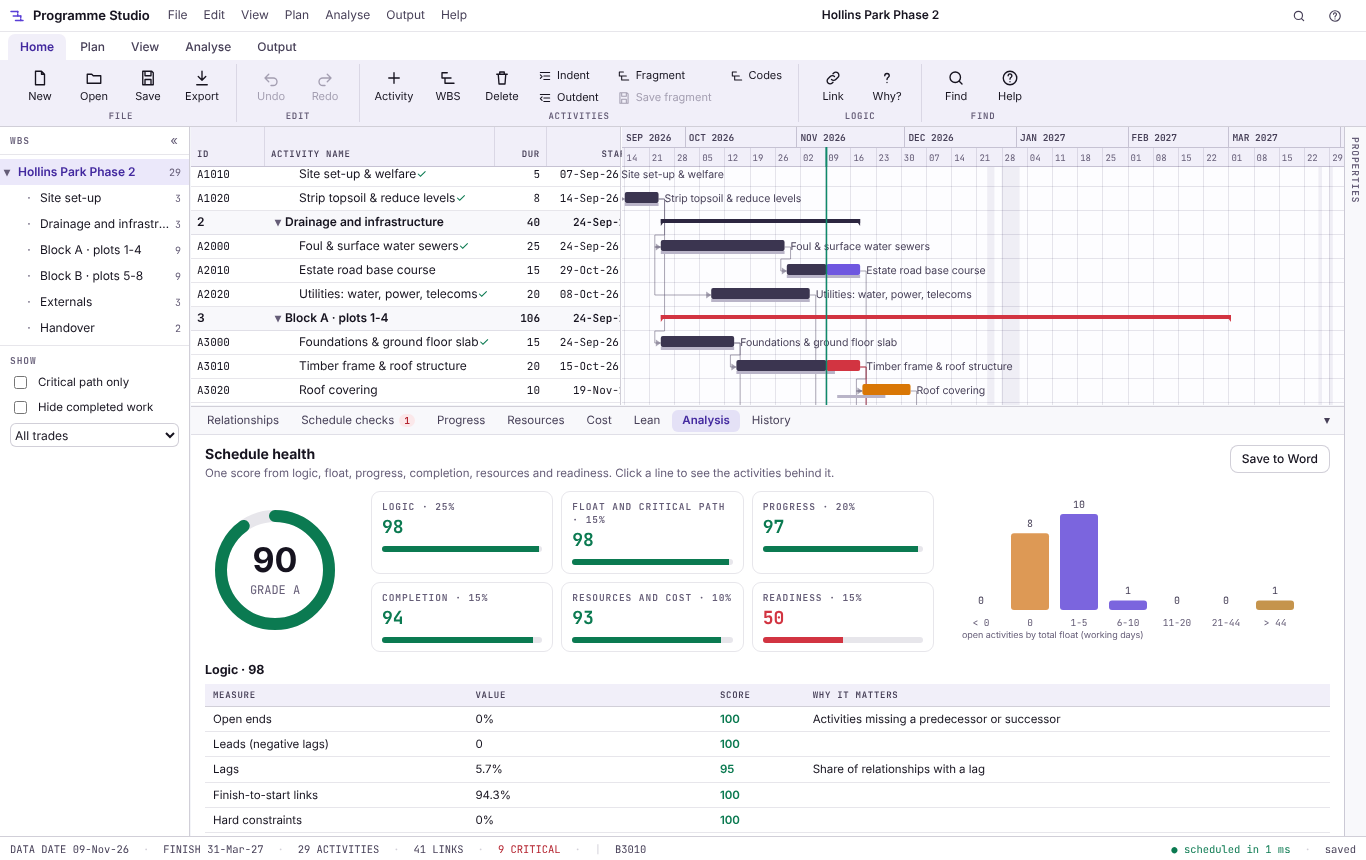
Schedule health and the 14-point check
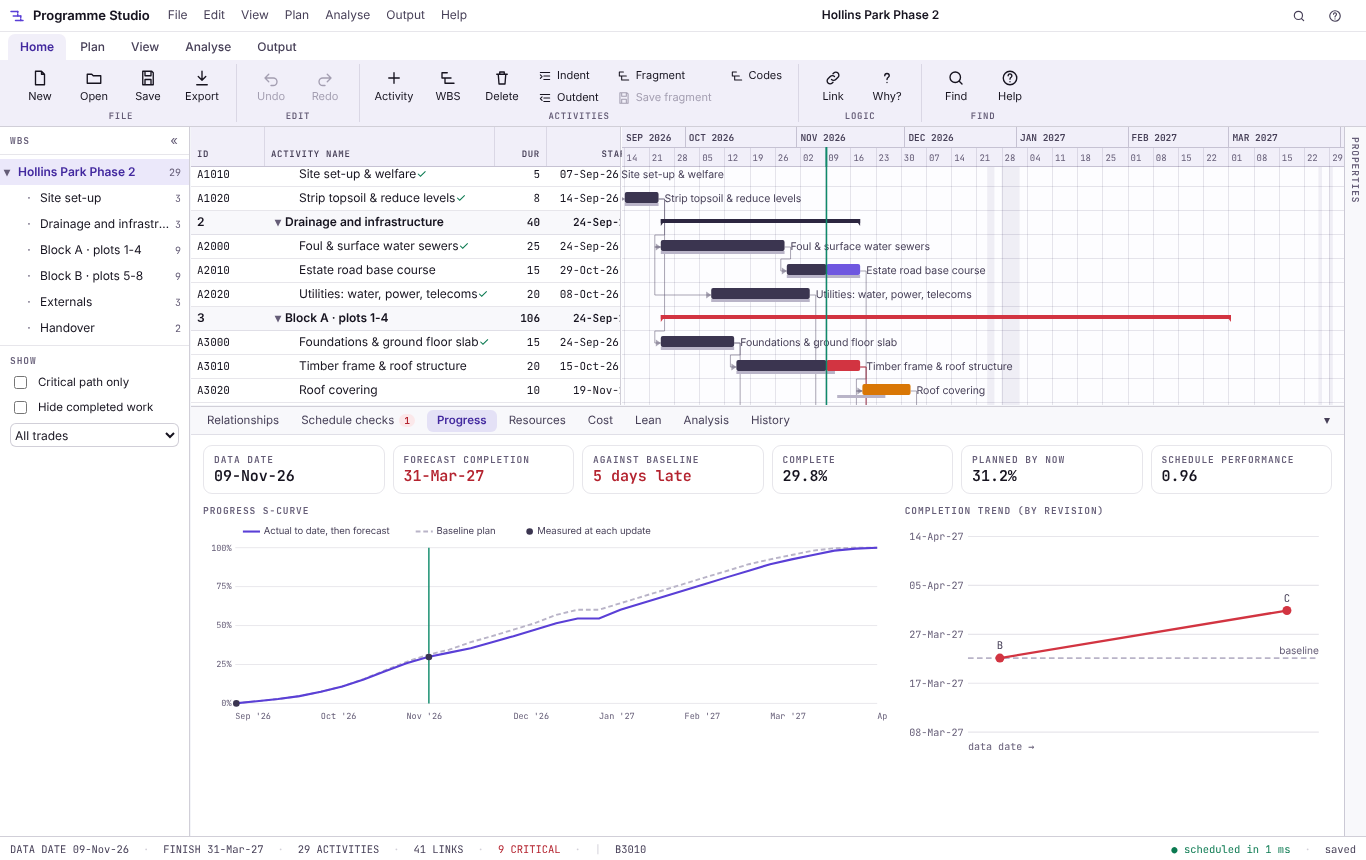
Progress, S-curve and completion trend
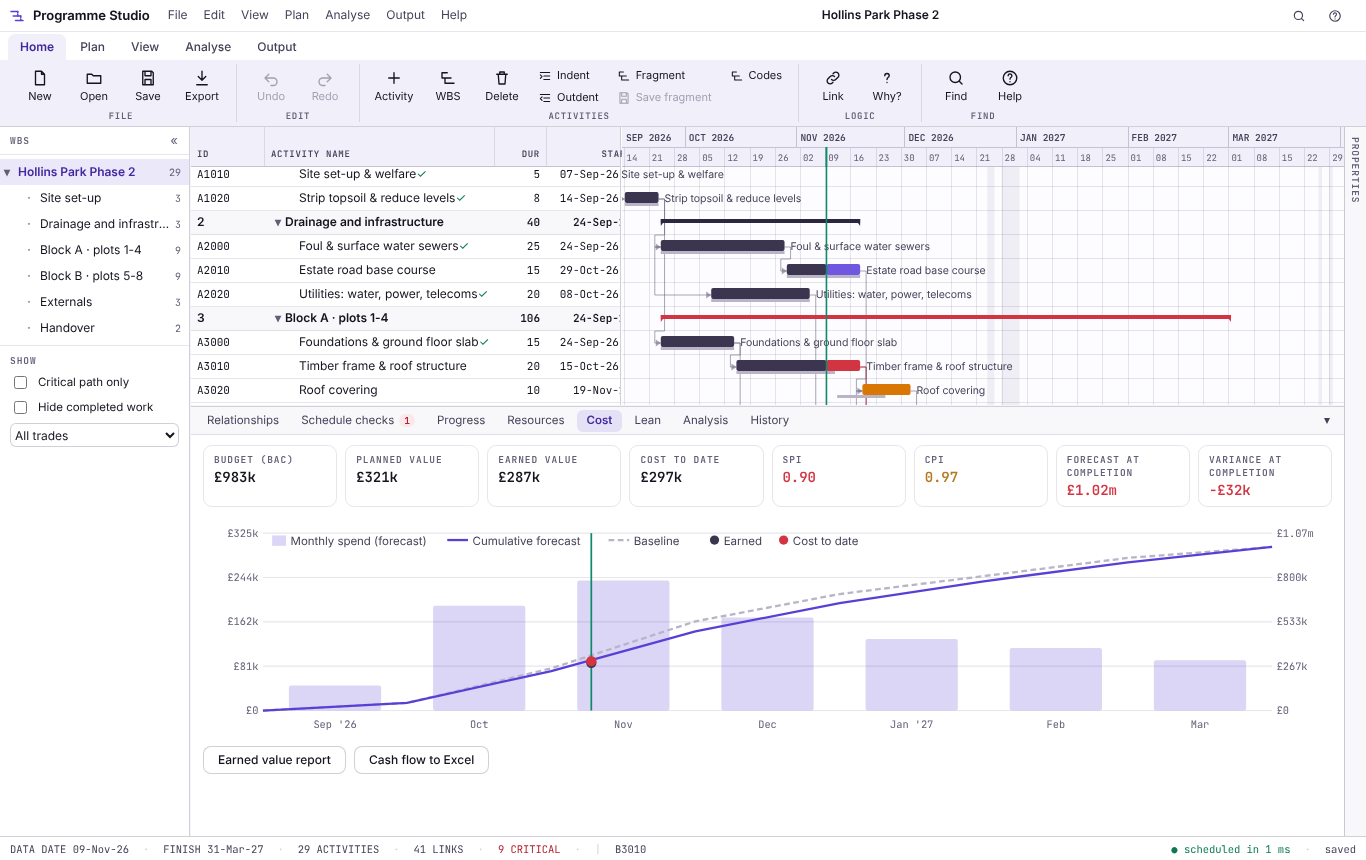
Cash flow and earned value
Opening, viewing and programmes of up to 50 activities stay free. Programme Studio Pro is a subscription for planners who update, analyse and report on the programme: £29.99 a month or £249 a year with a free Metre2 account, first week free.
Update against a data date in a wizard, save up to 11 baselines and as many revisions as you like, and see slippage, the S-curve and the completion trend. A Word progress report uses the NEC4 clause 32 headings.
Time impact analysis with a fragnet at the data date, windows analysis across revisions, and what-if scenarios on a copy, each with a Word report: the evidence for a compensation event or an extension of time.
Repeating work drawn as one flow line per trade through the plots or floors of a housing or fit-out job, and linear work drawn against chainage for roads, rail and pipelines.
Labour, plant and materials with rates, weekly histograms against site limits, levelling within float or to a limit, monthly cash flow against the baseline curve, and earned value with SPI and CPI.
Monte Carlo risk analysis for P50 and P80 dates with criticality and sensitivity, the 14-point schedule check, the NEC4 clause 31.2 checklist and a health score out of 100.
Weekly work plans with percent plan complete and reasons, a constraints log, takt trains through zones, and a progress sheet site managers fill in on a phone and send back.
A2, A1 and A0 sheets with a title block; P6 XER and XML, MS Project XML, MPX, Excel and IFC 4.3 export; and programmes of any size.
£29.99 a month or £249 a year with a free Metre2 account, paid by card through Stripe. The 7-day trial needs no payment details and switches off by itself; cancel any time.
| FEATURE | FREE | PRO £29.99/MO |
|---|---|---|
| Open P6 (.xer, .xml), MS Project (.xml, .mpx, .mpp converted), Excel and CSV | Yes | Yes |
| Critical path, float and driving logic, scheduled like P6 | Yes | Yes |
| Gantt, network and calendar views, filters, codes and colour by | Yes | Yes |
| Calendars with UK bank holidays, schedule checks and "why this date?" | Yes | Yes |
| Print to A4 and A3 (PDF and PNG), save .m2prog and CSV | Yes | Yes |
| Activities you can edit | 50 | No limit |
| Progress, baselines, revisions, look-aheads and progress reports | No | Yes |
| Time impact, windows and what-if delay analysis | No | Yes |
| Line of balance and time-chainage | No | Yes |
| Resources, levelling, cash flow and earned value | No | Yes |
| Monte Carlo risk, 14-point check, NEC4 checklist and health score | No | Yes |
| Last Planner, takt and phone progress from site | No | Yes |
| A2 to A0 printing; P6, MS Project, MPX, Excel and IFC export | No | Yes |
Yes, to open, view and build small programmes. Opening P6 and MS Project files of any size, the critical path, filters, the Gantt, network and calendar views, schedule checks and A4/A3 printing are free, and you can build and edit programmes of up to 50 activities. Programme Studio Pro, £29.99 a month or £249 a year with a 7-day free trial, adds progress and baselines, delay analysis, line of balance, time-chainage, resources and cash flow, risk, A1 printing, P6 and MS Project export, and programmes of any size.
Yes. It opens .xer and P6 XML files with their calendars, WBS, activity codes, user-defined fields, resources and progress, and shows the critical path and float straight away. With Pro it saves back to XER and P6 XML, keeping the tables it does not edit unchanged, so the file still opens in P6.
MS Project XML and .mpx files open directly. An .mpp file is a closed format a browser cannot read, so Programme Studio offers to convert it on Metre2's server: only if you agree each time, in memory, and nothing is kept. The same converter reads Asta Powerproject, Phoenix and Synchro files. Or save the file as XML from MS Project and open that.
It follows the same critical path method: a forward and backward pass on each activity's own calendar, float measured on the activity's calendar as P6 does, retained logic or progress override for out-of-sequence work, and the longest path. Its tests check the dates against the ones P6 and MS Project saved in their own files. It is a planning tool: the planner stays responsible for the programme.
For most contractor and subcontractor programmes, yes: building and linking the programme, calendars, codes, progress, baselines, delay analysis, resources and printing are all here, and it reads and writes their files. It is not a multi-user enterprise system: programmes are files you keep and share, not a shared database.
Yes. The NEC4 checklist goes through what clause 31.2 asks a programme to show, the progress report uses the clause 32 headings, and the time impact analysis gives the delay to Completion and the Key Dates for a compensation event quotation. It refers to clause numbers only, not the contract text.
Line of balance draws repeating work, such as plots on a housing site or floors in a fit-out, as one line per trade, so you can see each trade's rate and where one trade would catch up with the next. Time-chainage draws linear work, such as a road, railway or pipeline, against distance and time. Both are in Pro.
No. Programme Studio runs in your browser: programmes are kept in the browser as you work and saved as .m2prog files on your computer. The only exception is the optional .mpp converter, which you are asked about each time.
Not for the free version. Programme Studio Pro and its 7-day trial use a free Metre2 account, so your subscription works in any browser where you sign in.
Step by step, recorded in Programme Studio itself. Also: the help manual, how it is tested, and how it compares with Primavera P6, MS Project and Asta Powerproject.
