Imposition in your browser
Open your PDF and see its pages on the press sheet - the right way up, in order and clipped to their bleed. Saddle-stitched booklets, perfect-bound signatures with fold schemes and creep, 2-up and 4-up, step and repeat, gang-ups and cut and stack, checked with a folding dummy and written out as a press-ready PDF. No plug-in, no RIP and nothing uploaded, for a fraction of the price of the big imposition packages.
Saddle-stitched booklets with the sheets nested inside each other, pages turned head to head where the fold needs it and blanks put before the back cover. Free up to 32 pages on sheets up to SRA3.
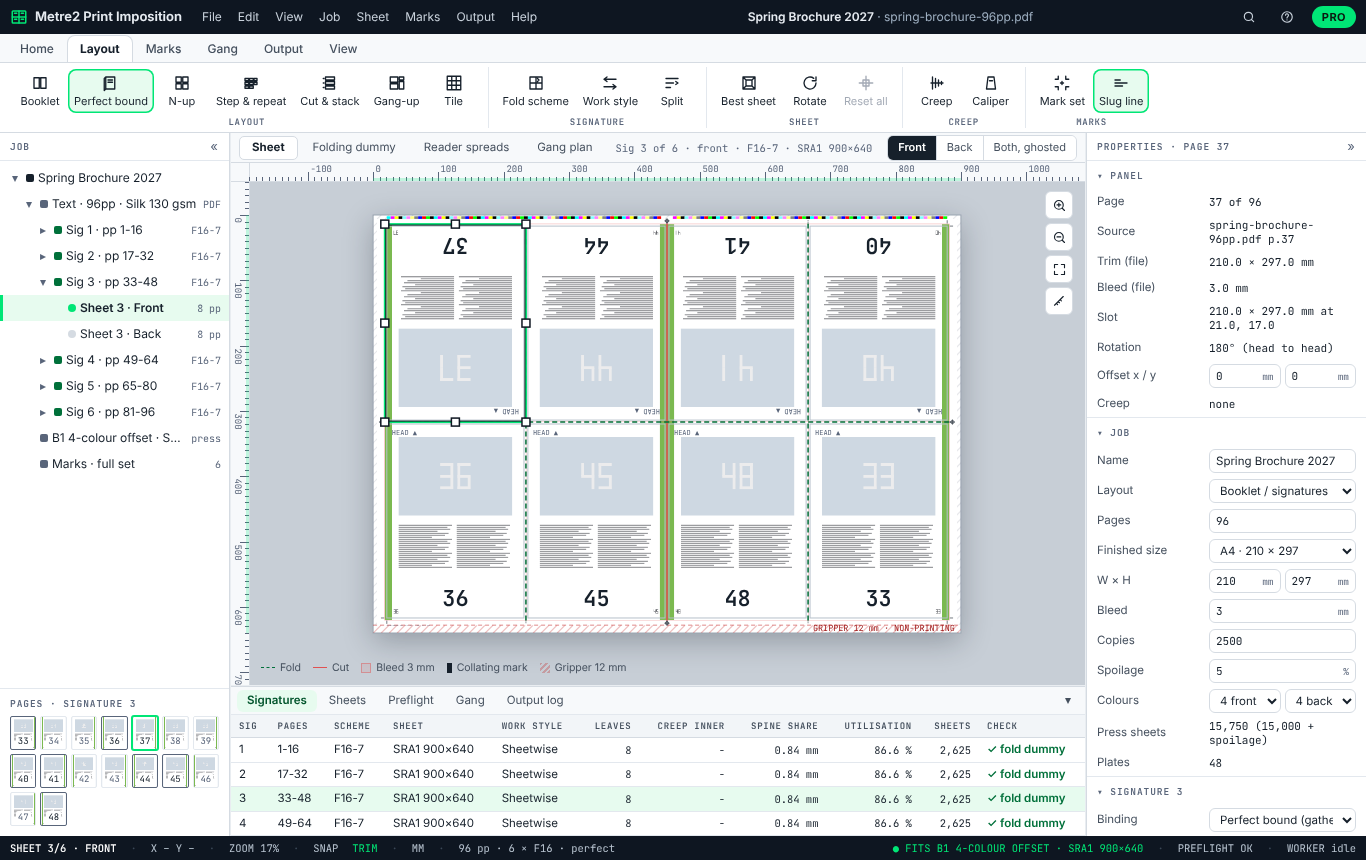
The sheet drawn to scale with the gripper and non-printing margins, every page shown from your PDF and clipped to its bleed, fold and cut lines, rulers in mm, and the back of the sheet ghosted through the front to check that pages back up.
Flyers in page order two or four to a sheet, and business cards, labels or postcards repeated to fill it, turned 90° if more fit, with the back mirrored so it backs up exactly.
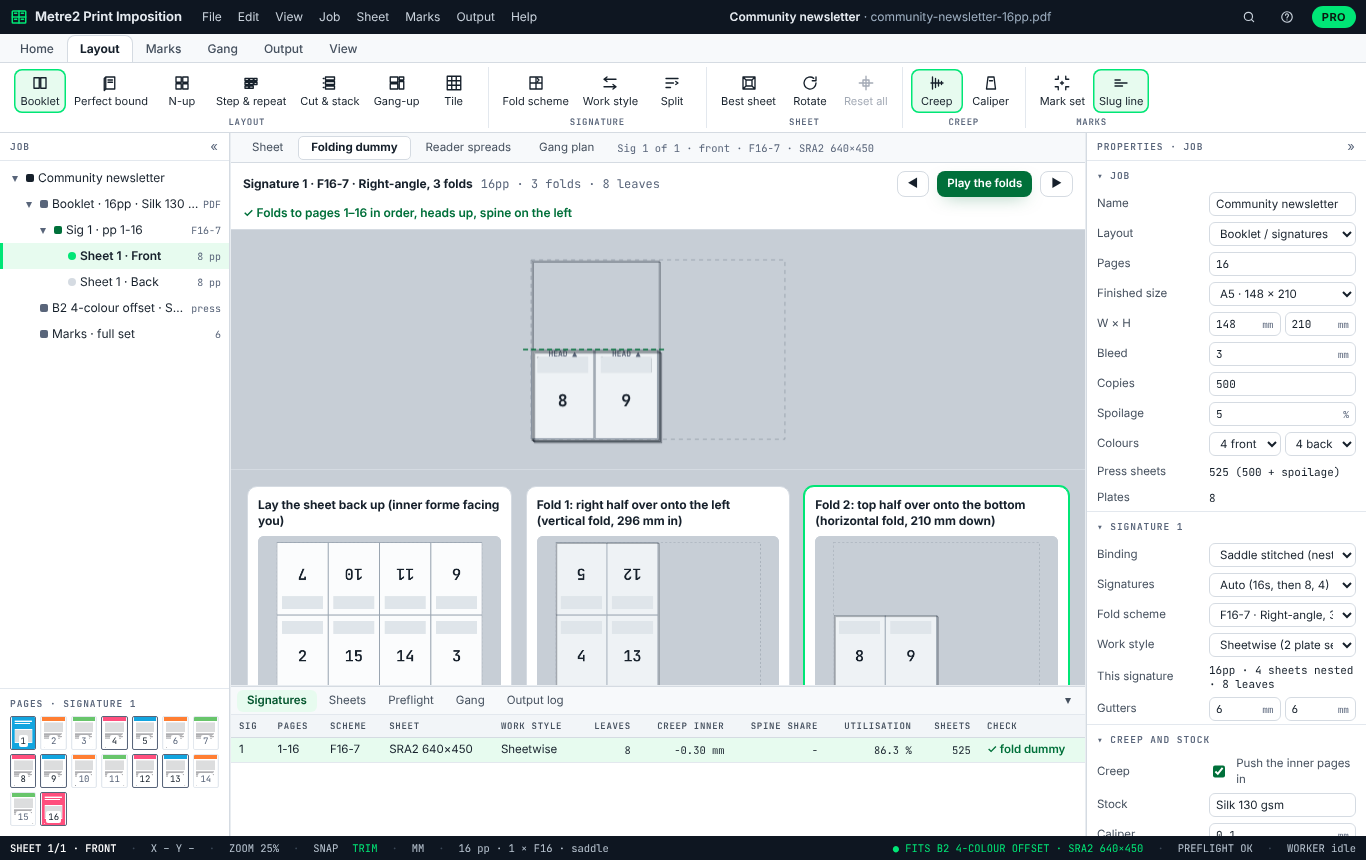
Watch each signature fold step by step and read the pages off the folded section, or print an A3 dummy to cut out and fold by hand before anything goes to press.
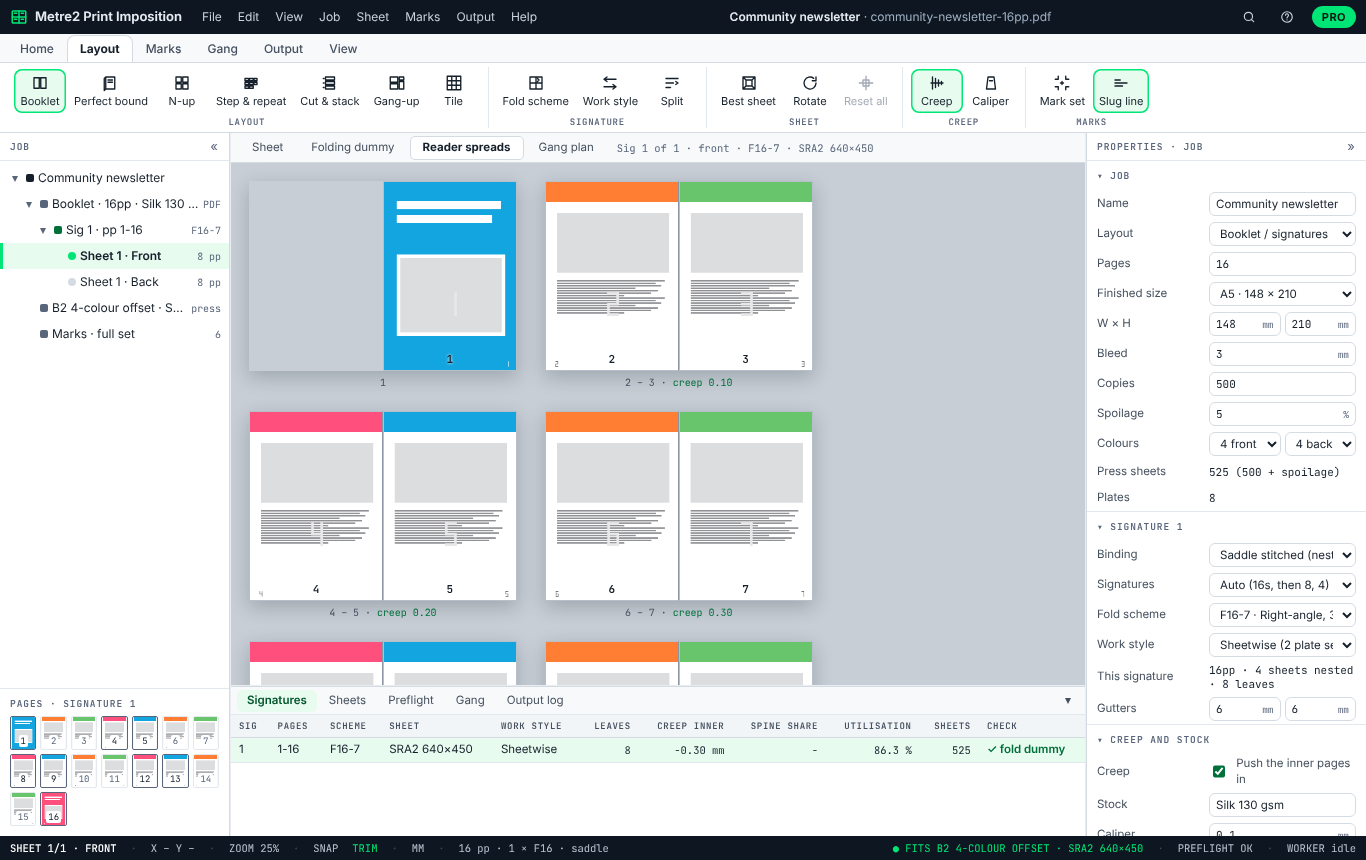
The finished booklet as the reader will see it, page by page in spreads, with the blanks marked and the creep on each spread.
Trim and bleed boxes, page sizes that don’t match the job, fonts not embedded, RGB images and colours, images below 250 ppi at their placed size, spot colours, transparency and the PDF/X output intent. It reports; it never changes your artwork.
Marks drawn where the trim and folds really are, clear of the bleed, in registration colour so they print on every plate.
One page per sheet side with your pages placed as vectors, never rasterised, and no watermark. PDFs are read and written on your computer; no account is needed for the free version.
Six sample jobs come with it, each with its own PDF: a 16-page A5 newsletter, business cards, a 96-page A4 perfect-bound brochure, five card jobs ganged on SRA3, 300 numbered raffle tickets and an A0 poster tiled on A3.
The folding dummy, fold by fold
Reader spreads with creep
Gang-up: the fewest sheets for five jobs
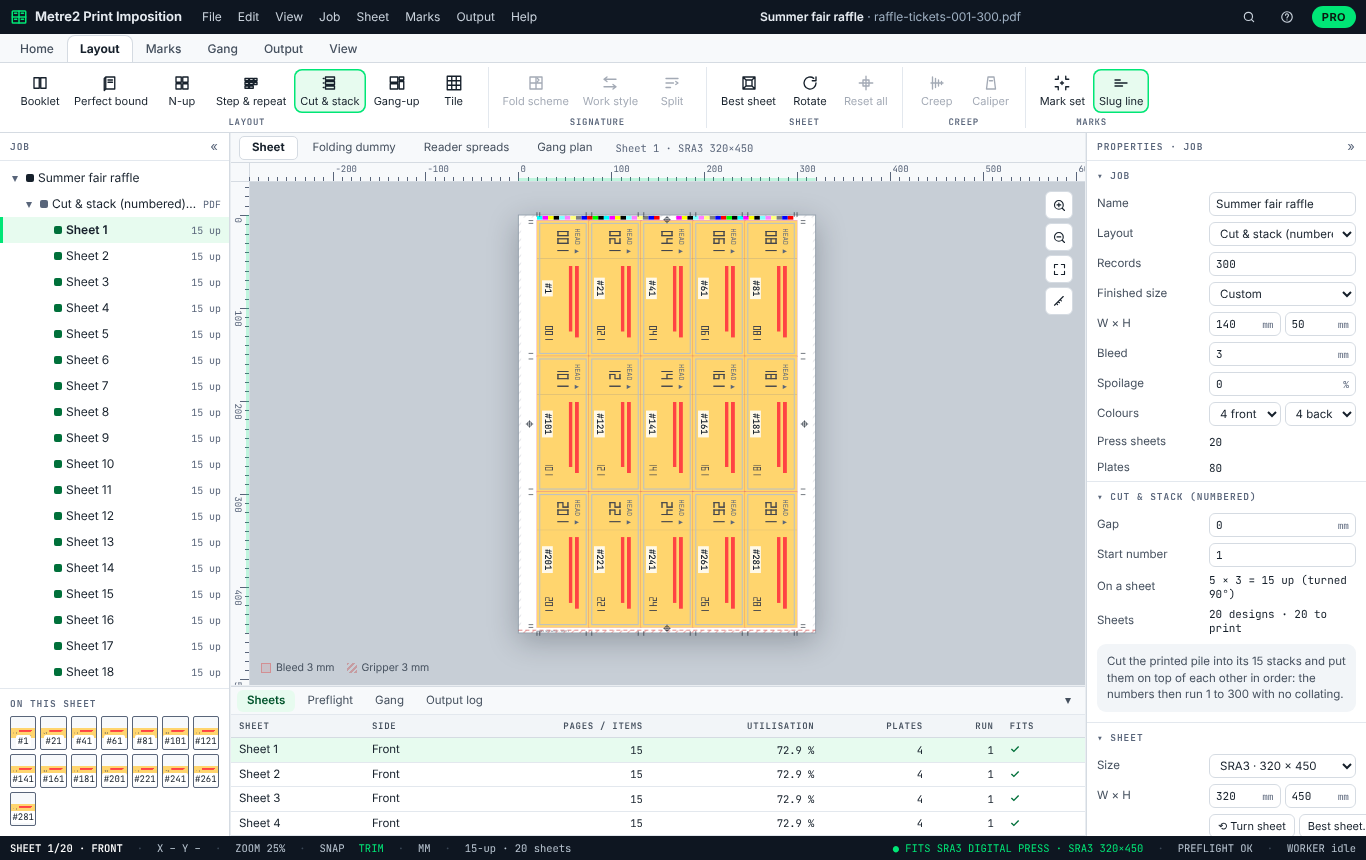
Cut and stack for numbered tickets
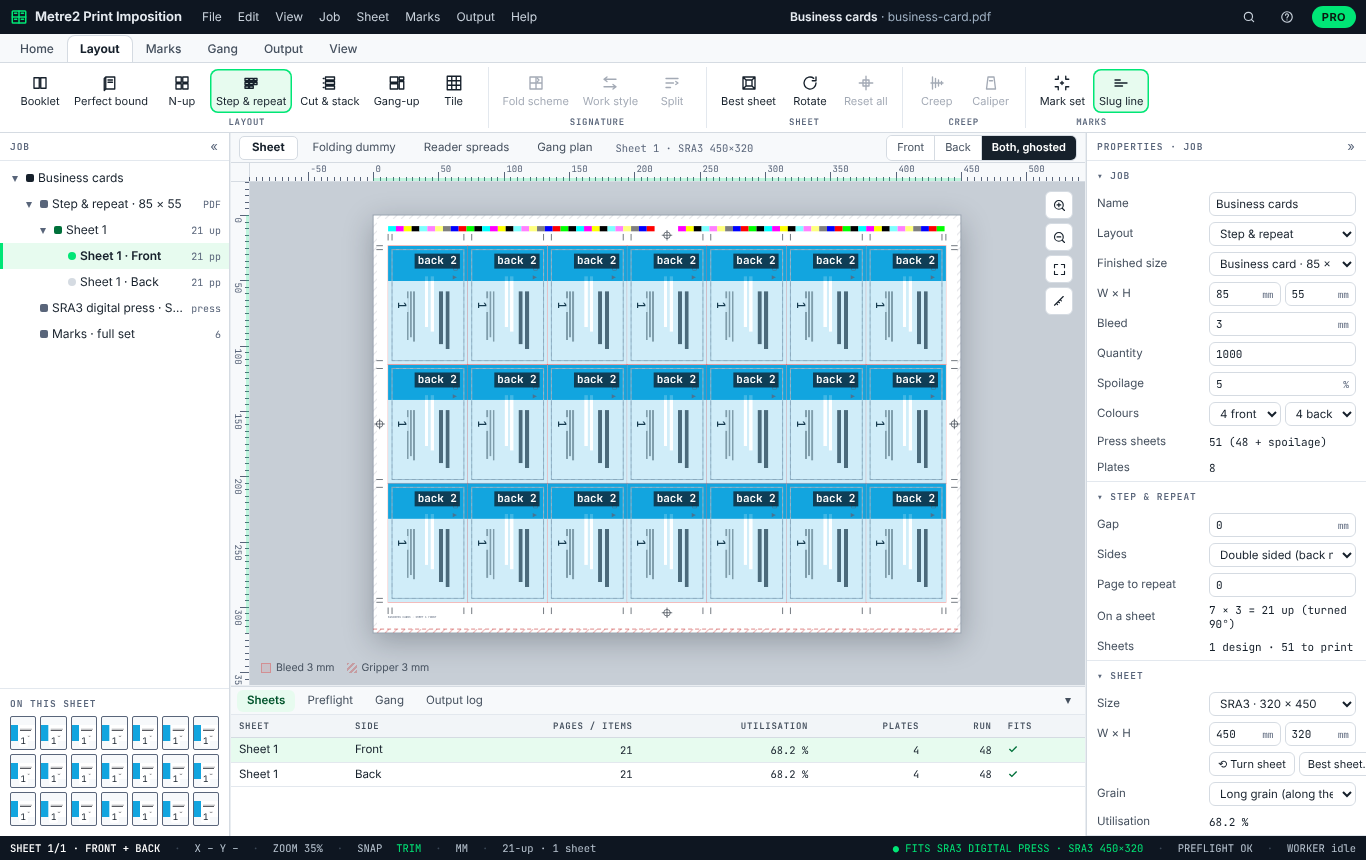
Step and repeat, backed up both sides
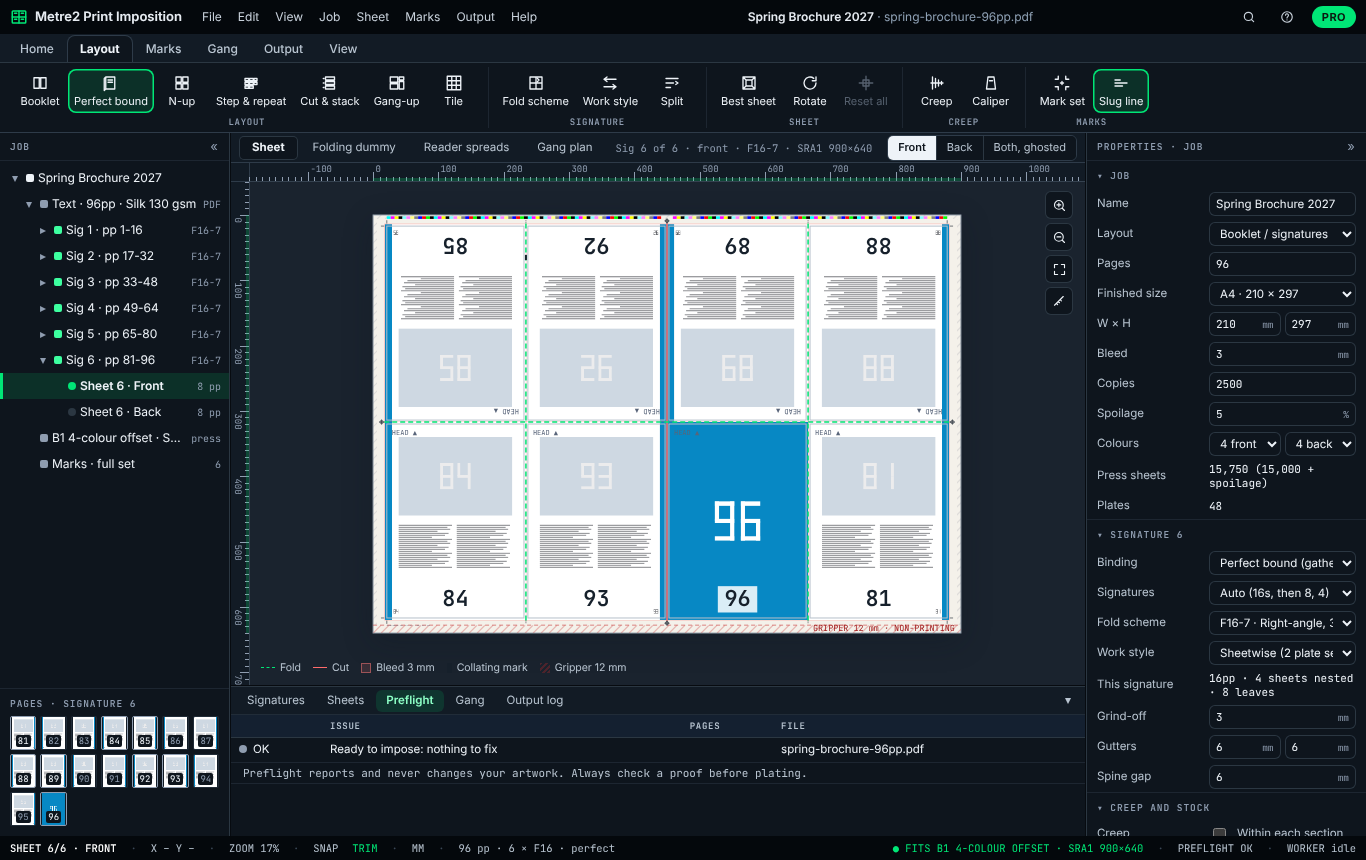
Press-room mode and preflight
Booklets up to 32 pages, 2-up, 4-up and step and repeat stay free. Print Imposition Pro is a subscription for print rooms and print buyers who impose every week: £14.99 a month or £129 a year with a free Metre2 account, first week free. Set up any layout in the free version and look at it; exporting one that uses Pro asks for Pro.
Gathered 16- and 32-page signatures for books of any length, with grind-off, the spine gap and the spine width worked out from the page count and caliper.
F4-1, F8-7, F16-7, F16-6 and F32-9, chosen per signature, each checked by folding it and reading the pages back.
Both formes on one plate, turned side to side or tumbled head to tail: half the plates, two copies a sheet.
Inner pages pushed towards the spine by the paper’s caliper, page by page, shown on the sheet and in the reader spreads.
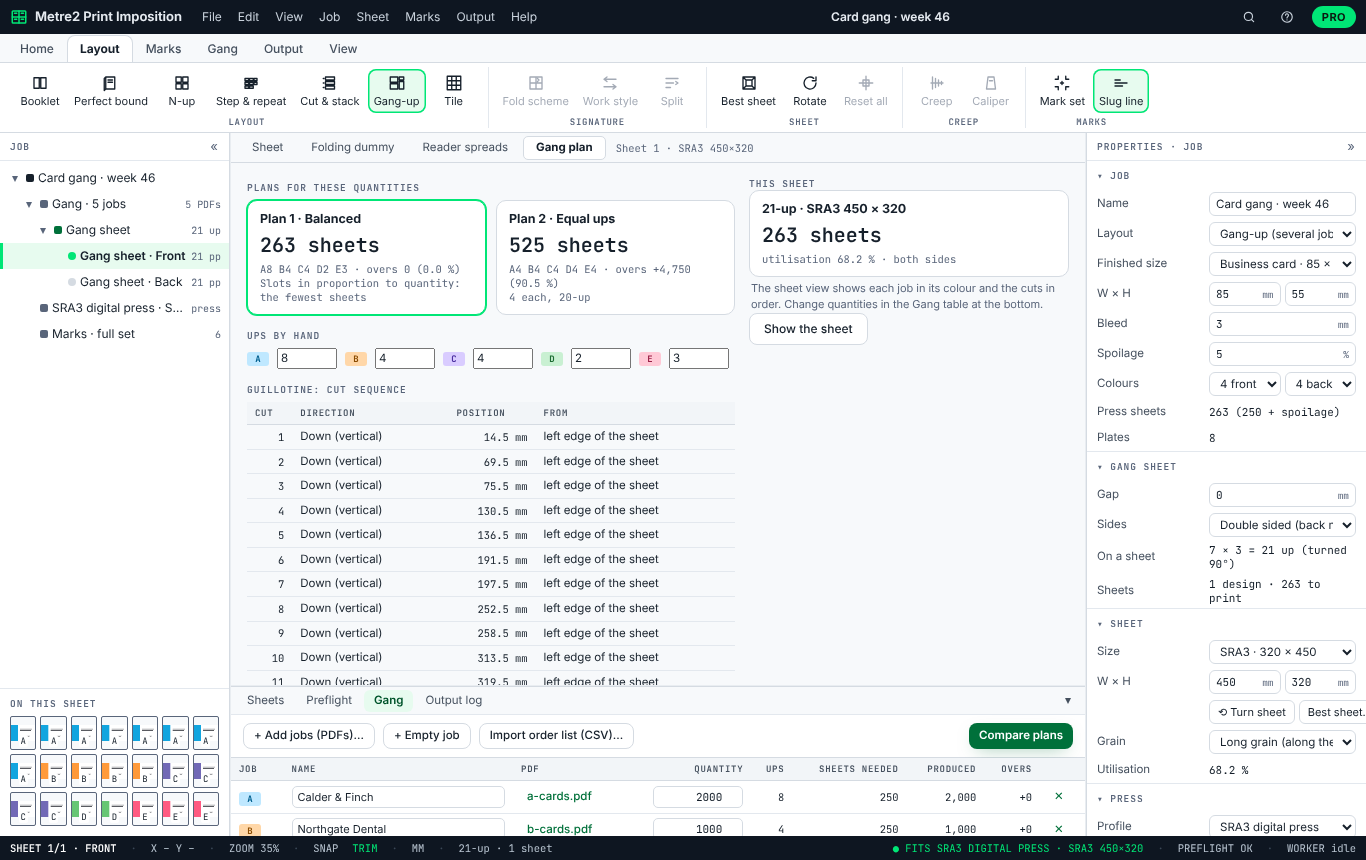
Several jobs of the same size on one sheet, with the slots shared out for the fewest sheets, the overs for each job and the guillotine cut sequence.
Numbered tickets, pads and NCR sets laid out so that cutting the pile and stacking the stacks gives the numbers in order, with no collating.
Posters split over A3 or SRA3 sheets with an overlap to join, and press sheets up to B1 with your press’s gripper, tail and side margins.
Registration targets, the colour bar, collating marks and the slug line; a job ticket with the cutting guide; and jobs saved as .m2imp templates.
| FEATURE | FREE | PRO £14.99/MO |
|---|---|---|
| Open PDFs, preflight, sheet view, folding dummy and reader spreads | Yes | Yes |
| Saddle-stitched booklets | Up to 32 pages | Any length |
| 2-up and 4-up, step and repeat of one item | Yes | Yes |
| Press sheet size | Up to SRA3 | Up to B1 |
| Crop and fold marks | Yes | Yes |
| Imposed PDF, proof and folding dummy PDF, no watermark | Yes | Yes |
| Perfect binding, 32-page signatures and the fold-scheme library | No | Yes |
| Work and turn, work and tumble | No | Yes |
| Creep from the paper’s caliper | No | Yes |
| Gang-up optimiser and cut sequence | No | Yes |
| Cut and stack numbering | No | Yes |
| Tiling posters over several sheets | No | Yes |
| Registration, colour bar, collating marks and slug line | No | Yes |
| Job ticket with the cutting guide, and templates | No | Yes |
Yes, for the everyday jobs. Saddle-stitched booklets up to 32 pages on sheets up to SRA3, 2-up and 4-up, step and repeat of one item, crop and fold marks, preflight, the folding dummy, reader spreads and the imposed PDF are free, with no watermark. Print Imposition Pro, £14.99 a month or £129 a year with a 7-day free trial, adds perfect binding and longer books, the fold-scheme library, work and turn and work and tumble, creep, sheets up to B1, the gang-up optimiser, cut and stack, tiling, full marks, the job ticket and templates.
Imposition arranges a job's pages on the press sheet so that, after printing, folding, binding and trimming, every page comes out the right way up and in order. A 16-page section, for example, prints eight pages on each side of the sheet, some upside down (head to head), so the folds bring them round in sequence.
No. Each page is placed on the press sheet as it is in your PDF, as a vector form, so fonts, vectors, spot colours and overprint are kept. Every page is clipped to its own bleed so it never prints over its neighbour. The imposed PDF has one page per sheet side.
Every fold scheme is checked by simulating the folds and reading the pages back off the folded section: they must come out 1, 2, 3 and so on, every head up, with the spine on the binding edge. The Signatures table shows the result for each signature, the Folding dummy view plays the folds, and you can print an A3 folding dummy to cut out and fold by hand. Always check a proof before plating. How it is tested.
In a saddle-stitched book the inner sheets stick out at the foredge by the thickness of the sheets wrapped round them, so their margins get trimmed smaller. Creep (shingling in the US) moves those pages towards the spine to compensate. Print Imposition Pro works it out page by page from the paper's caliper and shows the shift on every page.
F4-1 (one fold), F8-7 (8 pages, two right-angle folds), F16-7 and F16-6 (16 pages) and F32-9 (32 pages), named in the CIP4/JDF style. Sheetwise and perfecting are free; work and turn and work and tumble are in Pro. Signatures can be split as 16s, 8s and 4s, or 32s where they fit.
Give each job of the same finished size its quantity. The optimiser gives each job the number of slots on the sheet that makes the fewest sheets, compares that with equal ups, and shows the overs, the cut sequence for the guillotine and a job ticket. You can also set the ups by hand. It is in Pro.
For booklets, signatures, n-up, step and repeat, gang-ups and cut and stack, yes, without Acrobat or a Fiery server, in a browser. It does not yet have hot folders, JDF job tickets or variable-data printing, and it is not a plug-in for your RIP: you export an imposed PDF and print or plate from that. See how it compares with Quite Imposing, Fiery Impose and Kodak Preps.
No. Print Imposition runs in your browser: PDFs are read, previewed and imposed on your computer, and the imposed PDF is saved straight to it. Your job and its PDFs are kept in this browser so a reload carries on where you were.
Not for the free version. Print Imposition Pro and its 7-day trial use a free Metre2 account, so your subscription works in any browser where you sign in.
Step by step, recorded in Print Imposition itself, with the real numbers from each job. Also: the help manual, how it is tested, and how it compares with Quite Imposing, Fiery Impose and Kodak Preps.
Each one opens in the app with its PDF made on the spot, so you can look around before you open your own. Pro samples can be explored freely; exporting them needs Pro or its 7-day free trial.
How to use it, how we check that every page lands in the right place, and how it compares with the imposition packages most print rooms know.
