Small enough to send, sharp enough to build from
Make PDFs small enough to email without turning your drawings into blurry pictures. Photos and scans get smaller, repeated logos are stored once and hidden bulk is taken out - lines, text and dimensions stay exactly as they are.
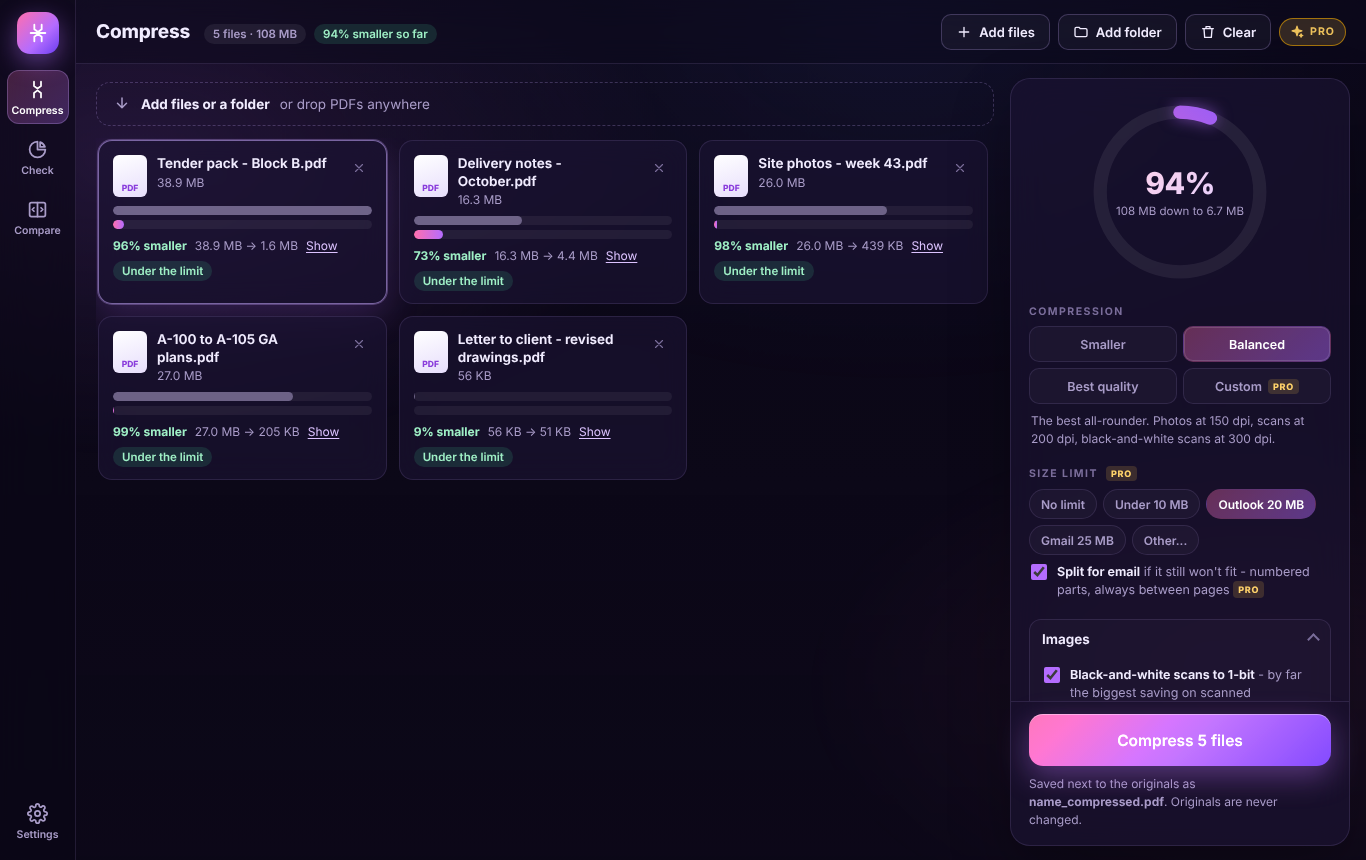
Pages are never turned into pictures. Lines, text and dimensions stay sharp at any zoom, and stay searchable and measurable.
Images stored at far more detail than the page shows are reduced and re-encoded. Black-and-white scans become crisp 1-bit images - usually 90% smaller or more.
The logo or title block on every sheet, fonts embedded twice, the same image pasted on ten pages - stored once, used everywhere.
Images, fonts, line work and hidden extras, page by page, with the heaviest pages listed - handy to send back to whoever produced the drawings.
Drag a slider across any page and zoom in, to be sure the smallest text is still crisp before anything goes out.
Everything happens on your computer; nothing is uploaded. Your originals are never changed, and a copy is never bigger than the file you started with.
Windows 10/11 and your browser · Free · Nothing uploaded · No account
Where a tender pack's size comes from, and a colour delivery-note scan zoomed in after compressing - the signature and stamp stay in colour.
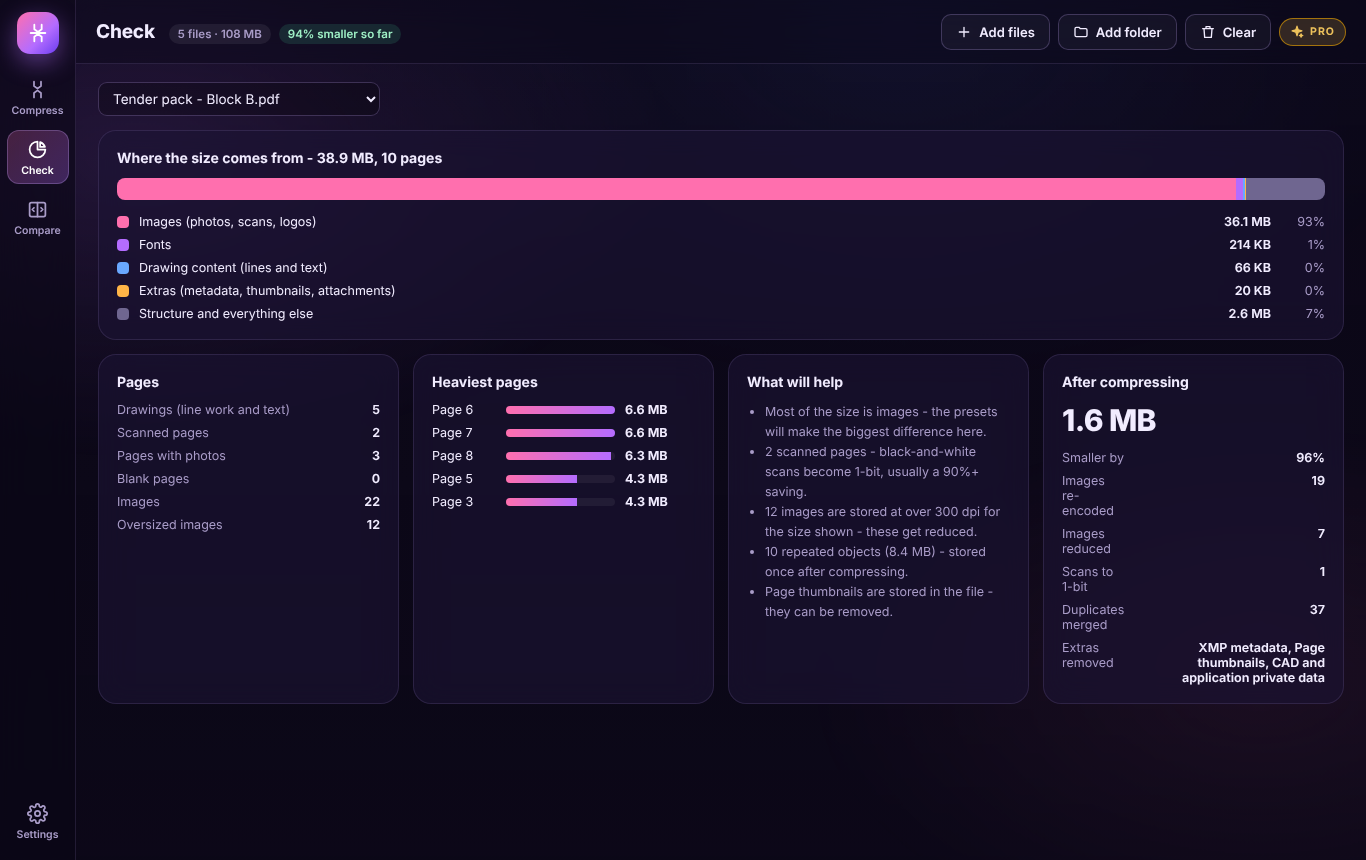
Check where the size comes from
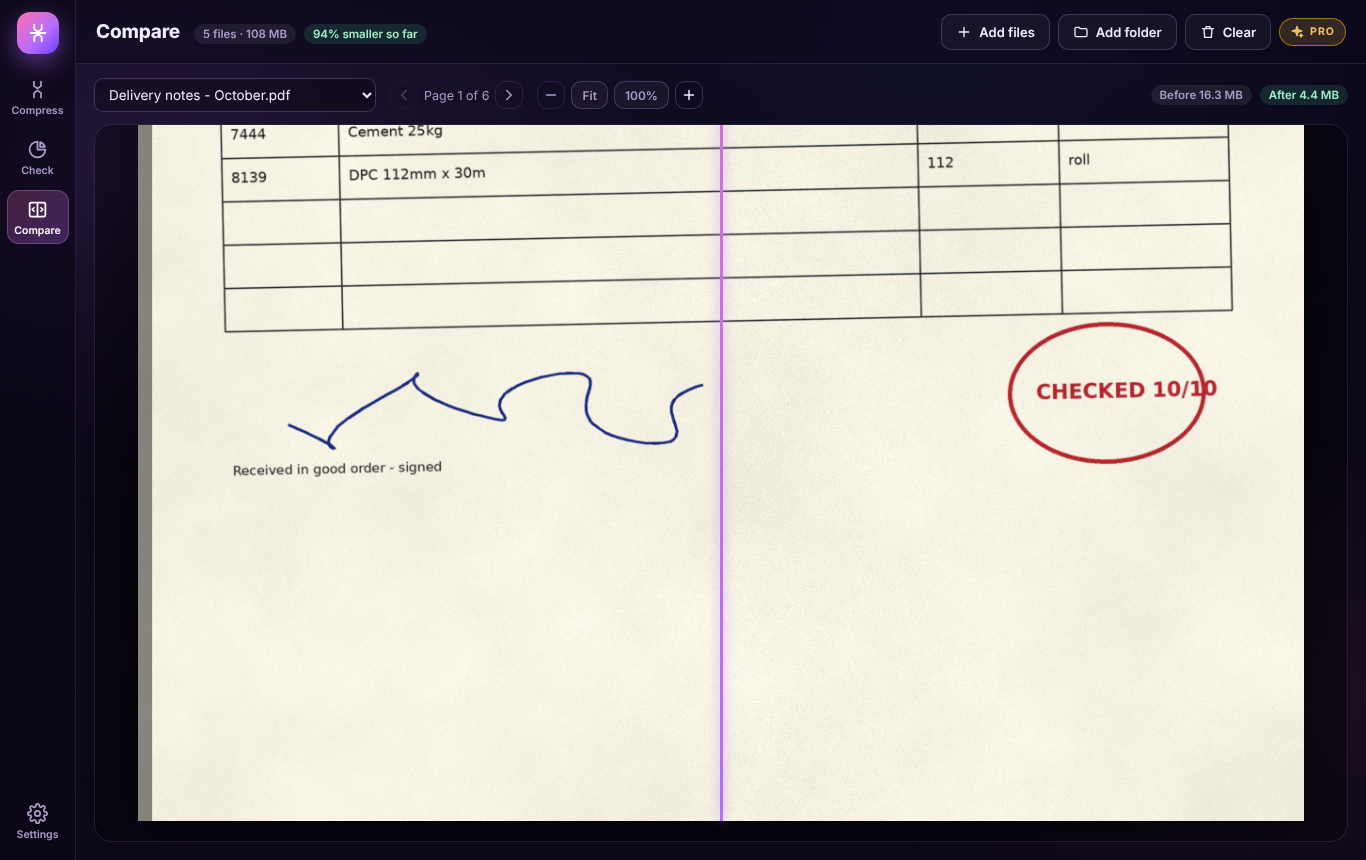
Compare before and after, zoomed in
Compressing stays free - the presets, the check and the compare, three files at a time. Compress PDF Pro is a one-off £12.99 upgrade inside the Windows app for people who send big PDFs every day, bought through the Microsoft Store - no subscription, no account.
Under 10 MB, Outlook's 20 MB, Gmail's 25 MB or your own - it tries each setting in turn until every file fits.
Anything that still won't fit is split into numbered parts, always between pages, ready to send in a few emails.
Drop a folder of hundreds and keep its sub-folders, or save over the originals once you're happy.
Hidden layers taken out, markups drawn in, and the author and software details stripped - plus greyscale and removing blank pages.
Your own resolutions and JPEG quality, saved as presets, with your own file name ending.
A CSV and a PDF report for every batch: before, after and what was done to each file.
| FEATURE | FREE | PRO £12.99 |
|---|---|---|
| Drawing-safe compression: Smaller, Balanced and Best quality | Yes | Yes |
| Removes hidden extras and repeats | Yes | Yes |
| The check and the before-and-after compare | Yes | Yes |
| Use it in your browser | Yes | Windows app |
| Files at a time | Three | Whole folders |
| Size limits and split for email | No | Yes |
| Clean for sending, greyscale and blank pages | No | Yes |
| Custom settings and presets | No | Yes |
| CSV and PDF savings reports | No | Yes |
No. Compress PDF never turns a page into a picture. Lines, text and dimensions stay exactly as they are - still sharp at any zoom, still searchable and still measurable. Only the photos, scans and hidden extras inside the file are made smaller.
It depends what's inside. Site photo reports and black-and-white scans often shrink by 90% or more, because phone photos and scans are stored at far more detail than the page shows. Colour scans usually shrink by a third or more on Balanced, and much more on Smaller. Drawings exported with a heavy title block or CAD data can drop a long way; a letter or report that is mostly text may only lose 10 to 20%. The Check tab shows where the size comes from before you start, and a file is never made bigger.
Yes. The Smaller, Balanced and Best quality presets, drawing-safe compression, removing hidden extras, the check and the before-and-after compare are free, three files at a time, on Windows and in your browser. Compress PDF Pro is an optional one-off £12.99 upgrade in the Windows app for size limits, splitting for email, whole folders, clean for sending, custom settings, presets and savings reports.
No. Everything happens on your computer - in the Windows app, or inside your browser tab in the browser version. Your originals are never changed; the compressed copies are new files saved as name_compressed.pdf.
With Compress PDF Pro, yes. Pick under 10 MB, Outlook's 20 MB, Gmail's 25 MB or your own limit and it tries each setting in turn until the file fits. Anything that still won't fit can be split into numbered parts, always between pages.
Not yet. A PDF encrypted by its author is listed as protected and left alone. Open it in the program that made it and save an unprotected copy first.
