The tin every small business has somewhere
Tracks small cash in and out with a running balance, a lightweight receipt reference and category tags - so the office cash tin has a proper record instead of a shoebox of slips. A red flag tells you the moment it needs topping up.
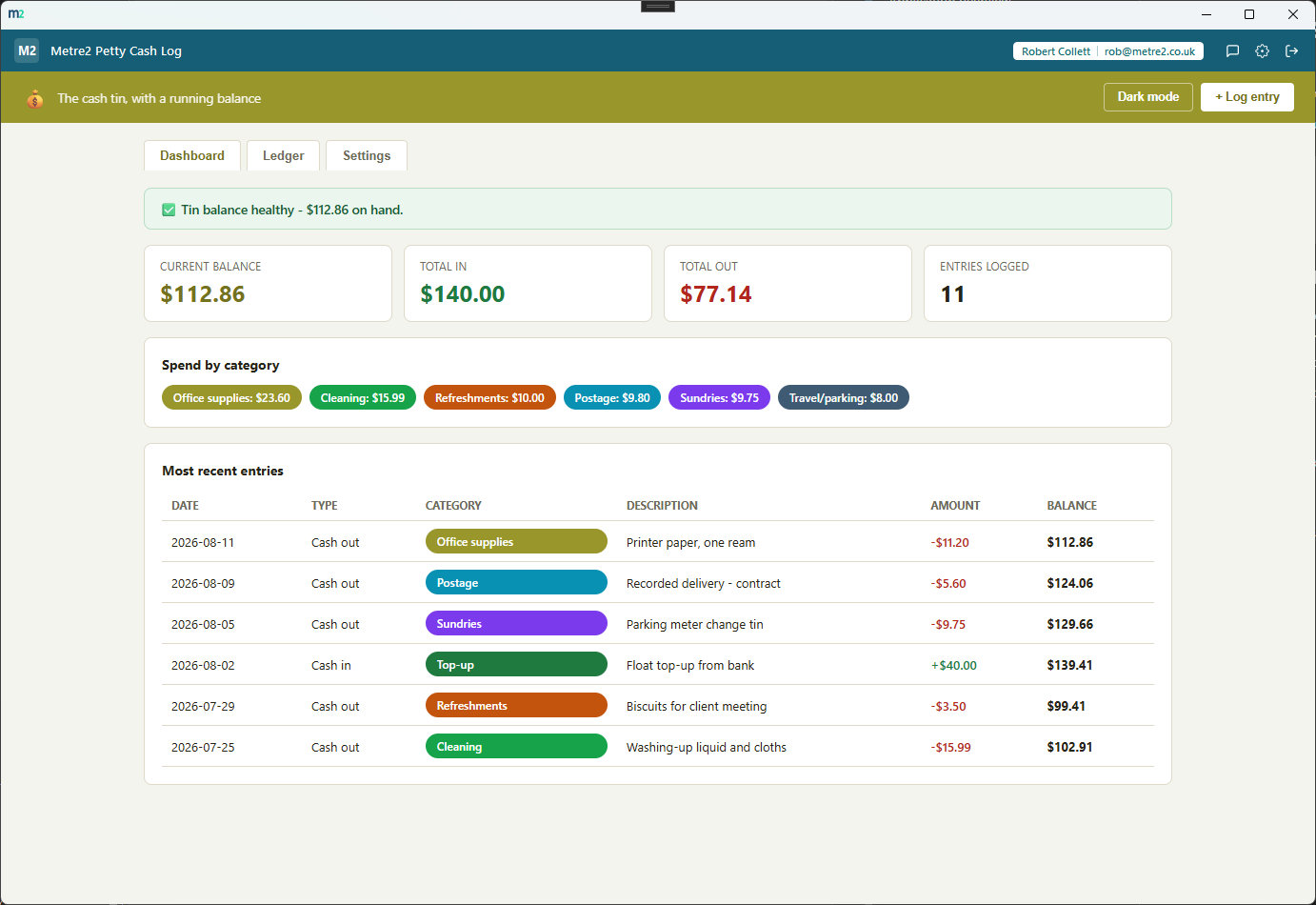
The Dashboard's balance flag and category breakdown, and the Ledger - a single chronological table with a running balance on every row.
Dashboard - current balance, a low-balance flag, and spend by category
Ledger - every entry, newest first, with a running balance on every row
Log cash in or out and the Ledger keeps a per-row running balance, calculated chronologically from your starting float - always know exactly what should be in the tin.
Once the balance drops to or below your threshold (£20 by default), the Dashboard flags "Tin running low - top it up" in red - the honest nudge before it actually runs dry.
Every entry gets a category, each with its own colour - office supplies, postage, refreshments, cleaning and more, all renameable, recolourable and extendable in Settings.
No camera flow, no OCR - just a text field for a receipt number or where the paper slip lives, so entries can still be tied back to a physical receipt when needed.
Every entry lives in one sortable table, searchable by description, category or receipt reference, and filterable by type or category.
Export the full ledger, running balance included, any time - for a backup, a spreadsheet pivot, or handing a record to your bookkeeper.
The Dashboard rolls up every "cash out" entry by category, so you can see at a glance where the tin's money is actually going.
A light/dark toggle that remembers your choice, and "Load sample data" fills in a realistic month of entries so you can see it working before entering your own.
No expense-approval workflow, no receipt scanning, no accounting-suite ambitions - just a running cash log for the tin, and nothing you don't need.
Everything lives in local storage on your device - no server, no internet connection required to use it day to day.
Most small businesses track petty cash in a spreadsheet that drifts out of date, or a notebook by the tin that nobody actually reconciles. Here's how a dedicated log compares.
| Feature | Petty Cash Log | A spreadsheet | A notebook by the tin |
|---|---|---|---|
| Pricing model | £0.79 one-off after trial | Free, but manual formulas | Free |
| Running balance calculated automatically | ✓ | ✕ (breaks the moment a formula gets overwritten) | ✕ |
| Flags when the tin needs topping up | ✓ | ✕ | ✕ |
| Searchable, sortable, filterable log | ✓ | ✕ (needs manual filtering set up each time) | ✕ |
| Category spend breakdown | ✓ | ✕ (needs a pivot table) | ✕ |
| Set-up time | Minutes | An hour or more building formulas | None, but nothing to search later |
General comparison as of August 2026 - features vary by spreadsheet template. Not sponsored by or affiliated with any spreadsheet vendor.
No - it keeps a lightweight text reference field instead (a receipt number, or a note on where the paper slip is filed). It's deliberately not a scanning or OCR tool; it's a running log of what went in and out of the tin.
Once the running balance drops to or below your low-balance threshold (£20 by default, adjustable in Settings), the Dashboard flags "Tin running low - top it up" in red - a prompt to add more cash before the tin actually runs dry.
It's a Windows desktop app. It is not yet available on the Microsoft Store - a Store listing is planned, but for now the app is built and ready ahead of submission.
Yes. Settings lets you add, rename, recolour or remove categories - the app ships with a starter set (office supplies, postage, refreshments, travel/parking, cleaning, sundries, top-up) but none of it is fixed.
Everything persists on your device between sessions - nothing is uploaded anywhere. The app works entirely offline with no server dependency, and data doesn't currently sync across multiple devices.