A unified compliance command centre for certifications, insurance, PAT testing & training
Trade certifications, insurance policies, PAT testing records and staff training, unified under one roof with a single "what's expiring across everything" view sorted by urgency, a per-holder/per-asset grouping so you can check any one person or van at a glance, a renewal cost forecast, a hand-rolled compliance health gauge, a renewal history/audit trail, bulk renew, a horizontal expiry timeline and full search - broader than a single-purpose licence or insurance tracker, on purpose.

Every certification, insurance policy, PAT test and training record across your whole business, sorted by urgency - overdue first, then due soon, then valid - filterable by type and by holder, with clear colour-coded status badges. The single view that neither the Licence & Permit Expiry Tracker nor the Insurance Renewal Tracker offers on their own.
Every record grouped by who or what it belongs to - a person's name for certifications and training, or an asset/policy reference for PAT tests and insurance - each with its own compliance percentage, so "is everything current for Priya Shah?" or "is this van's compliance up to date?" is a one-glance answer.
Total upcoming renewal cost over the next 30, 90 and 365 days, aggregated from each record's optional renewal cost and broken down by record type - a simple sum, not an estimating feature, but genuinely useful budgeting information no sibling tracker offers.
A genuine SVG radial gauge on the Overview workspace showing an overall compliance health percentage - valid records score full marks, due-soon records half marks, overdue records none - plus a per-record-type breakdown bar so you can see exactly where your compliance is weakest.
Renewing a record - whether from its own detail view or via bulk renew - logs the previous expiry date and the renewal date to that record's history rather than silently overwriting it, so there's a running track record of compliance over time for every holder and asset.
Select multiple records - a batch of PAT tests done in one site visit, for example - and push their expiry dates forward by 30/90/180/365/730 days or a custom period in one action, calculated from each record's current expiry or from today. Every renewal is logged to that record's history automatically.
A hand-rolled 16-week horizontal strip, one row per record type, with a coloured marker for every upcoming expiry along the date axis - deliberately a different shape from a month-grid calendar, showing the shape of your renewal workload at a glance.
A horizontal workspace switcher (Overview, Expiring, By Holder/Asset, Timeline, Renewal Forecast, All Records) sits under a slim top command bar, and a persistent right-hand Risk Rail - the health gauge, most urgent records and a live 30-day renewal cost - stays visible whichever workspace you're viewing.
One global search box in the top command bar searches title, holder, issuing body and reference number across all four record types at once, with instant results you can click straight through to.
A record-keeping and reminder tool only. It doesn't replace the holder's own responsibility to renew certifications, insurance or training on time, it isn't legal or regulatory compliance advice, and it doesn't replace a proper compliance management system for large organisations with complex regulatory obligations.
Copy a plain-text summary of your compliance health, forecast and most urgent records to your clipboard, or export a standalone HTML snapshot of your full record set that opens in any browser - no account or server required.
Light/dark theme remembers your choice, and two rotating sample data sets - each spanning all four record types with a realistic mix of overdue, due-soon and valid records, renewal history and varied holders/assets - let you explore every workspace before logging your own data.
SafetyCulture (iAuditor) is a well-known cloud inspection and audit platform. It's built for general-purpose digital checklists across large, multi-user teams - here's how a focused, one-off desktop tool compares for a contractor who just needs certification, insurance, PAT and training expiry tracking done well.
| Feature | Compliance & Certification Manager | SafetyCulture (iAuditor) |
|---|---|---|
| Pricing model | £19.99 one-off after a 30-day free trial | Free up to 10 users; Premium from $24/user/month billed annually; Enterprise custom quote |
| Cost scales with team size | ✕ | ✓ |
| Works fully offline | ✓ | ✕ |
| Purpose-built cert/insurance/PAT/training renewal tracking | ✓ | ~ |
| Digital inspection/audit checklist builder with photo evidence | ✕ | ✓ |
| Renewal cost forecast & compliance health score | ✓ | ✕ |
| Multi-user team assignment & role-based permissions | ✕ | ✓ |
| Native iOS/Android mobile app | ✕ | ✓ |
| No account or sign-in needed | ✓ | ✕ |
Comparison based on SafetyCulture's publicly listed pricing and features as of August 2026 (safetyculture.com, capterra.com) - pricing and features change over time, so check safetyculture.com for current details. SafetyCulture (iAuditor) is a trademark of its respective owner; this comparison is for informational purposes and isn't sponsored by or affiliated with SafetyCulture.

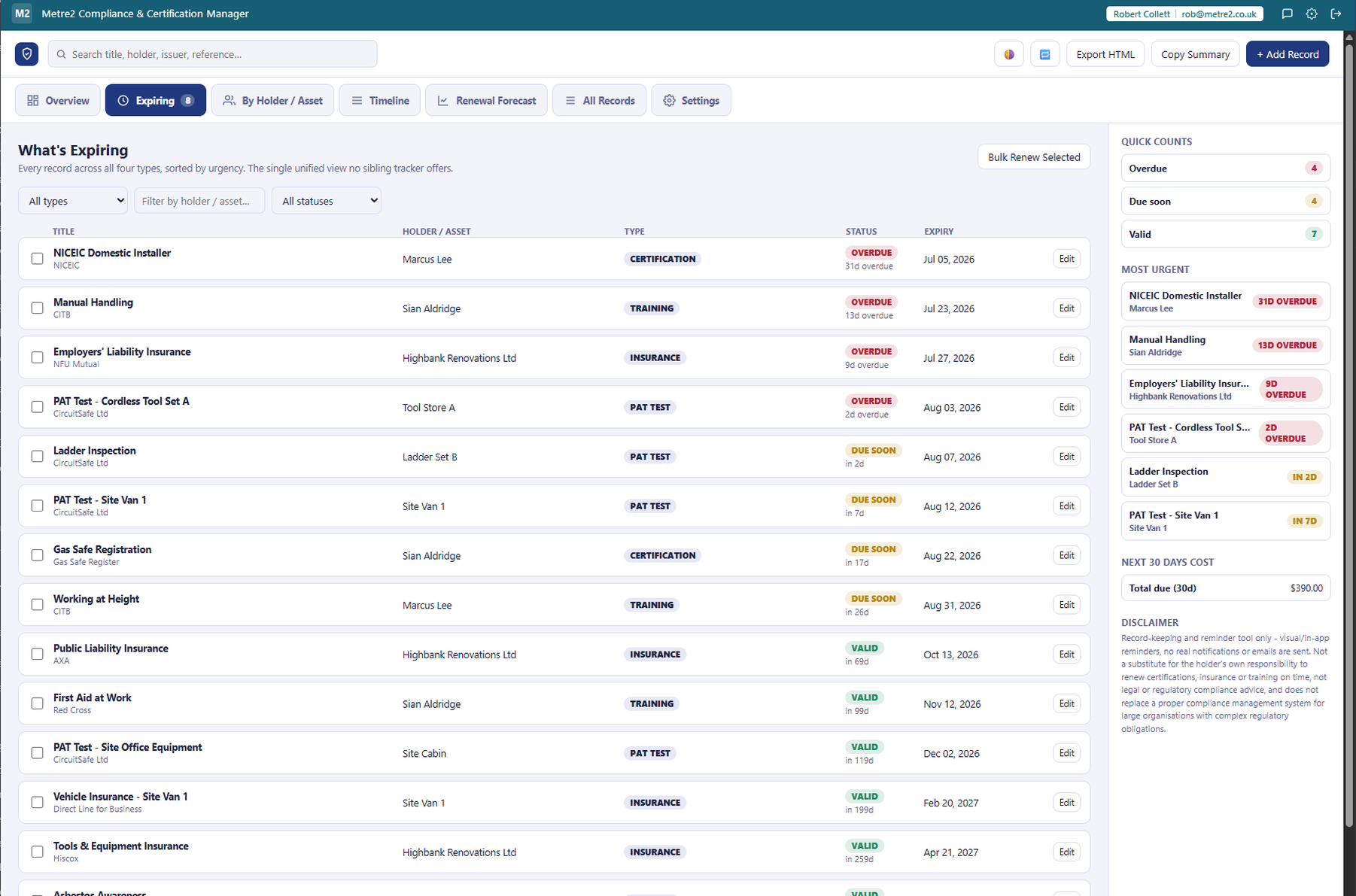


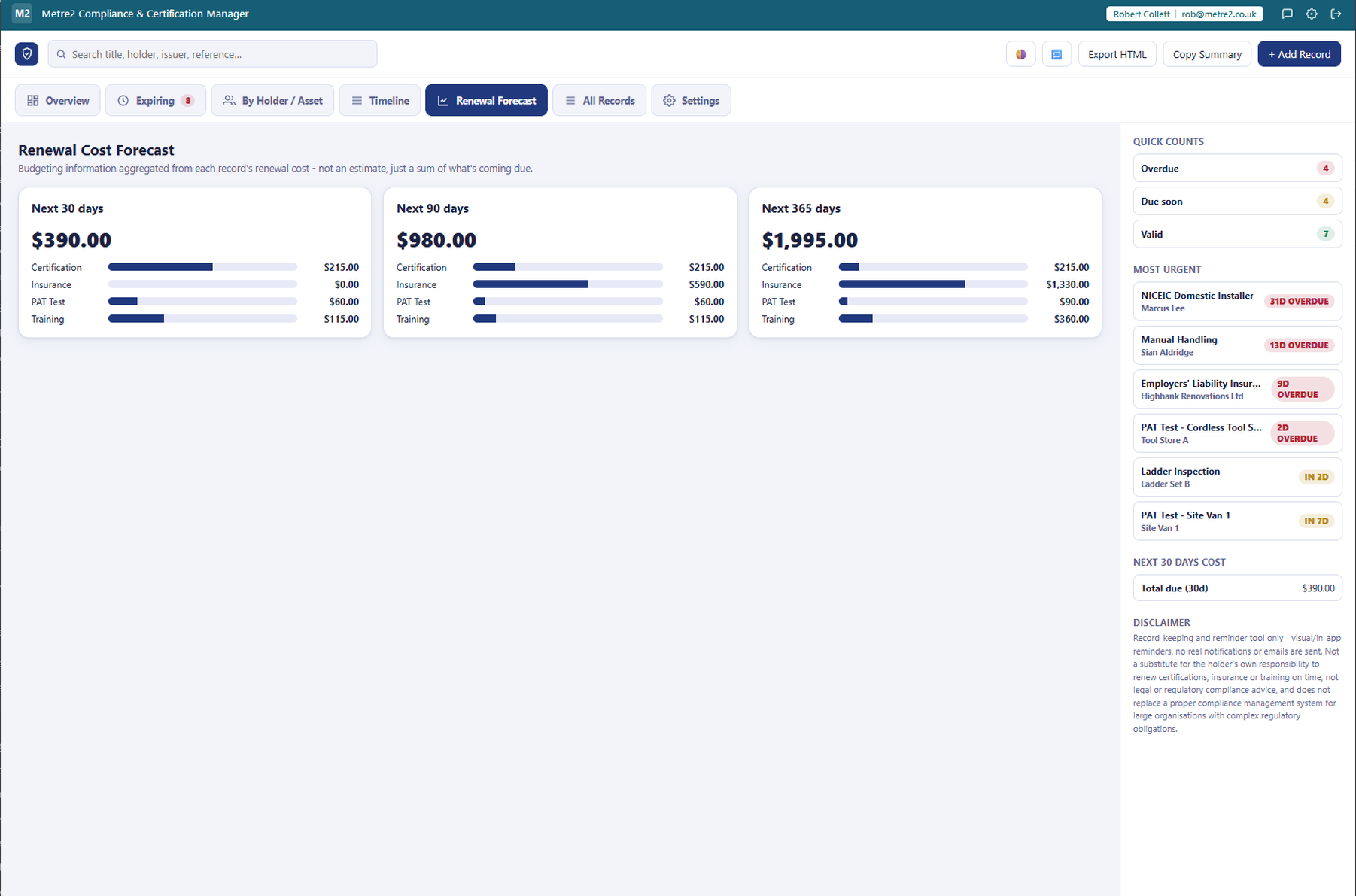
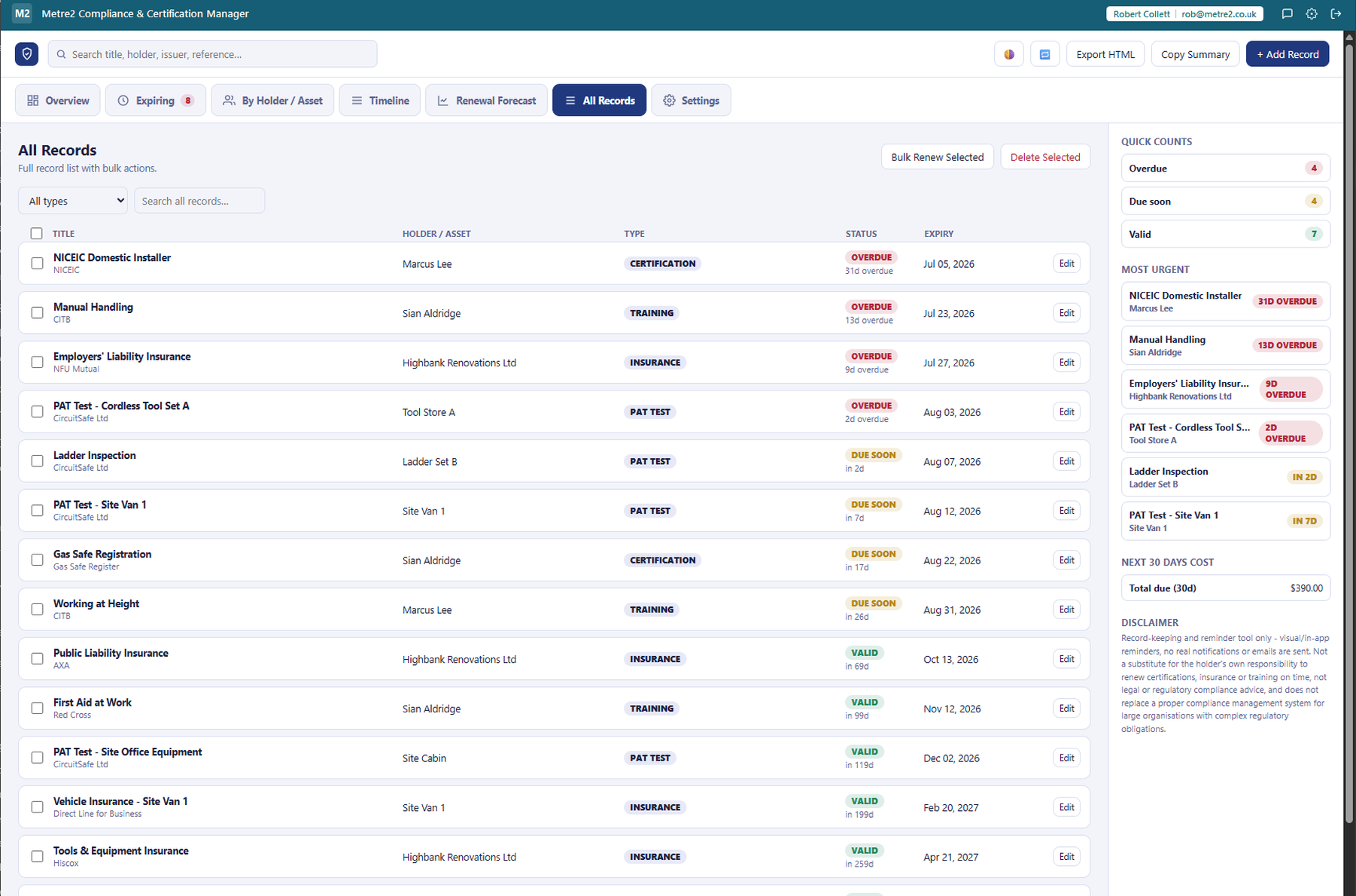
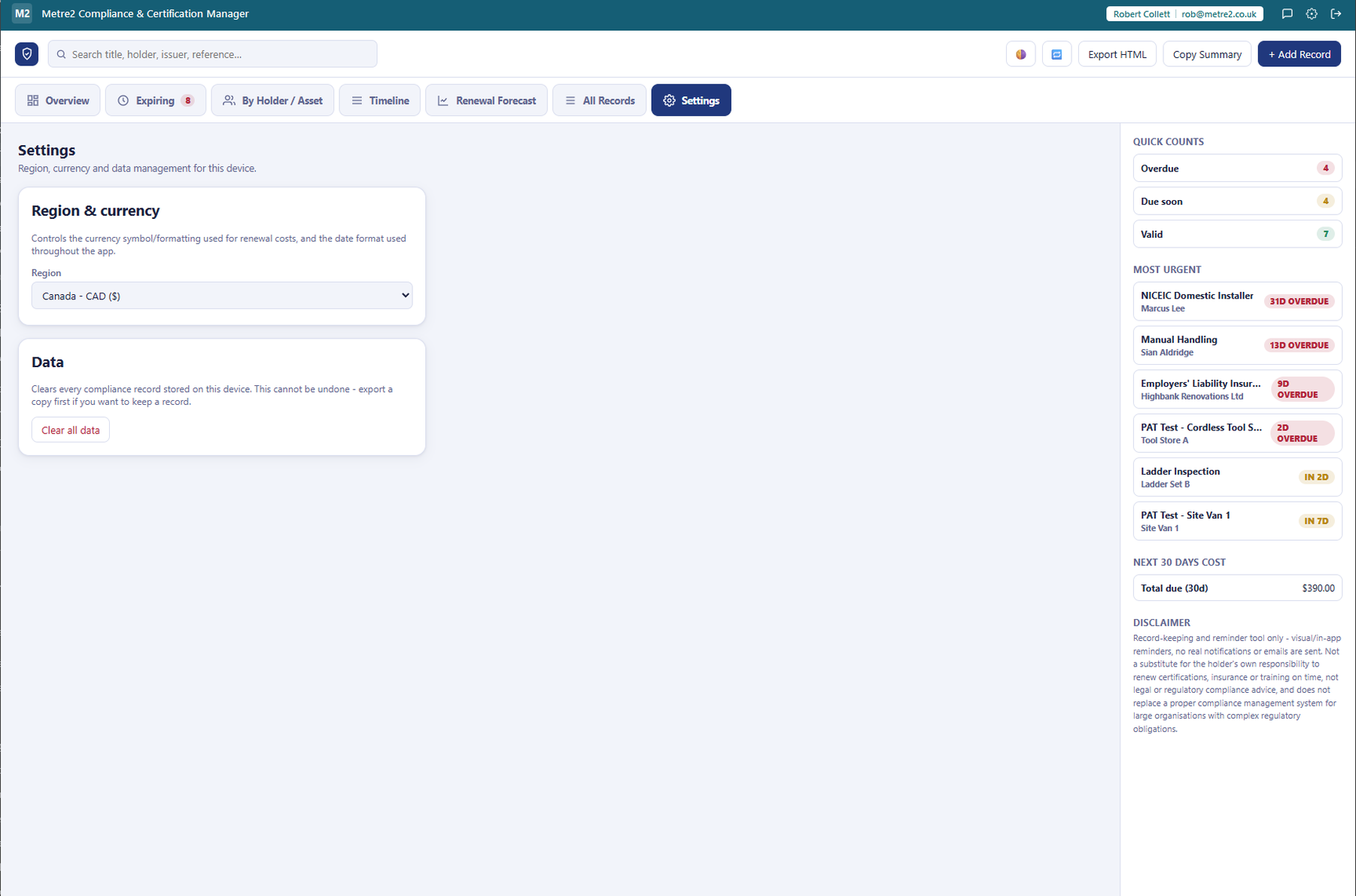
Compliance & Certification Manager is deliberately broad: it unifies trade certifications, insurance policies, PAT testing records and staff training under one roof, with a single "what's expiring across everything" view, per-holder/per-asset grouping, a renewal cost forecast and a compliance health score - so you're not checking four separate places to know what needs renewing.
Certification (e.g. Gas Safe Registration, NICEIC, CSCS cards), Insurance (Public Liability, Employers' Liability, Professional Indemnity and similar policies), PAT Test (portable appliance testing records for tools, vans and site equipment) and Training (First Aid at Work, Working at Height, Manual Handling and similar staff training records). Every record carries a title, a holder (a person for certs/training, or an asset/policy reference for PAT/insurance), issue and expiry dates, an issuing body, an optional reference number, an optional renewal cost and a customisable reminder lead time.
No - it's a deliberately different shape. There's no vertical sidebar. A horizontal workspace switcher strip (Overview, Expiring, By Holder/Asset, Timeline, Renewal Forecast, All Records) sits under a slim top command bar, and a persistent right-hand Risk Rail panel - a radial health gauge, the most urgent records and a live 30-day renewal cost total - stays visible at all times regardless of which workspace you're viewing.
Every record has its own reminder lead time in days (30 by default, editable per record). A record is Overdue if its expiry date has passed, Due soon if it expires within its lead-time window, and Valid otherwise. The Expiring workspace sorts every record across all four types by this urgency, most urgent first.
A hand-rolled radial gauge on the Overview workspace: each record scores 1 point if valid, 0.5 if due soon, and 0 if overdue, averaged across all your records for an overall percentage, plus a per-record-type breakdown so you can see at a glance whether, say, your insurance is in better shape than your PAT testing.
A simple sum of the optional renewal cost you've logged against each record, for everything expiring in the next 30, 90 and 365 days, broken down by record type. It's budgeting information only, not an estimating feature and not payment processing - it just totals what you told it a renewal is likely to cost.
The By Holder/Asset workspace groups every record by who or what it belongs to - a person's name for certifications and training, or an asset/policy reference for PAT tests and insurance - with a per-holder compliance percentage, so you can answer "is everything current for this person or this van?" in one glance instead of hunting through a flat list.
Yes. Renewing a record - either from the record's own detail view or via bulk renew - logs the previous expiry date and the renewal date to that record's history rather than silently overwriting it, so there's a running audit trail of compliance over time per holder or asset.
Select multiple records - for example a batch of PAT tests done in one site visit - and push their expiry dates forward by a chosen period (30/90/180/365/730 days or a custom number) in one action, calculated either from each record's current expiry or from today's date. Every renewed record gets its own history entry.
A hand-rolled horizontal 16-week strip, one row per record type, with a coloured marker for every upcoming expiry positioned along the date axis - deliberately a different shape from a month-grid calendar, so you can see the shape of your renewal workload over the next few months at a glance.
No - reminders are visual and in-app only (the Overview stats, the Risk Rail and the Expiring workspace's urgency colour-coding). No emails or push notifications are sent, no payment processing happens for renewal costs, and there's no integration with real certification bodies or insurers.
Yes - a global search box in the top command bar searches title, holder, issuing body and reference number across every record. Copy a plain-text summary to your clipboard, or export a standalone HTML snapshot of your data that opens in any browser with no account required.
No. Compliance & Certification Manager is a record-keeping and reminder tool only - it is not a substitute for the holder's own responsibility to renew certifications, insurance or training on time, it is not legal or regulatory compliance advice, and it does not replace a proper compliance management system for large organisations with complex regulatory obligations.
You don't need one. Install Compliance & Certification Manager from the Microsoft Store and start using it - there's no sign-up. If you'd like to hear about updates you can register your copy with a name and email, but nothing depends on it.
