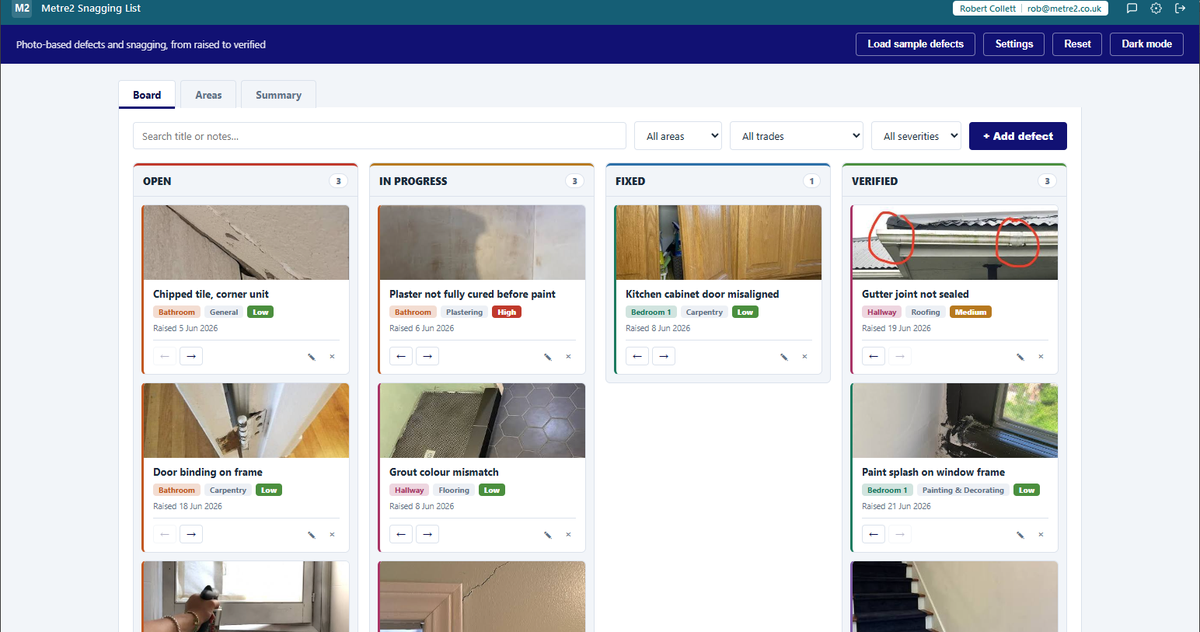
Photo-based defects and snagging list for handover - any trade or profession. A status
board moves every defect from Open through In Progress and Fixed to Verified, an Areas
view rolls the same defects up by room or location, and a Summary tab surfaces the
oldest open item and a by-trade breakdown. Defects persist between sessions, and you can
export the lot as CSV or PDF whenever you need it.
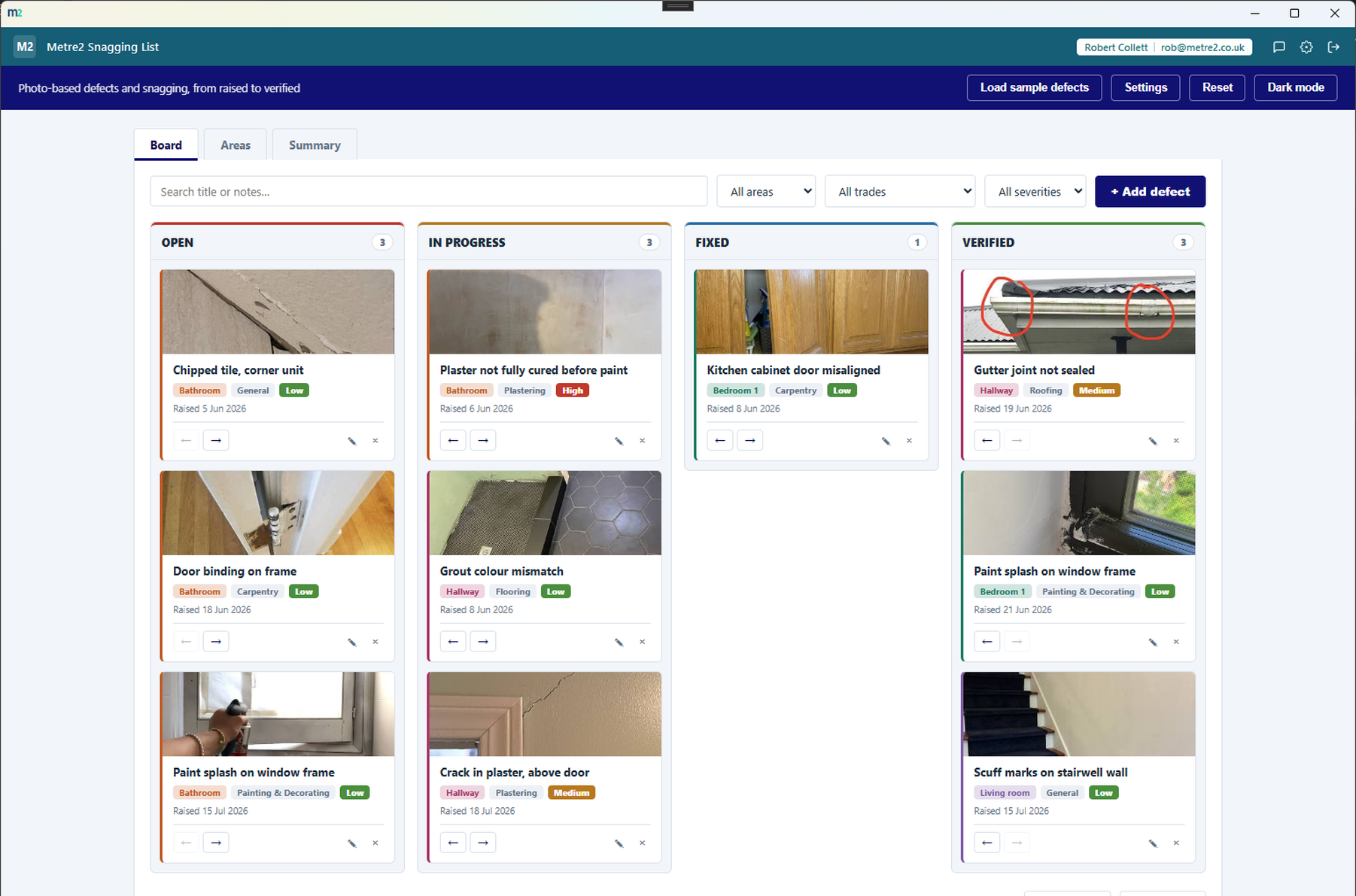
Every defect is a photo card that moves left to right through Open, In Progress, Fixed
and Verified - click the arrows on any card to move it along or back, no dragging
required.
Attach a photo, right from the form
Every defect can carry a photo, resized and compressed on your device before it's
saved - the first genuinely photo-based capture flow anywhere in the Metre2
portfolio.
See where the open items actually are
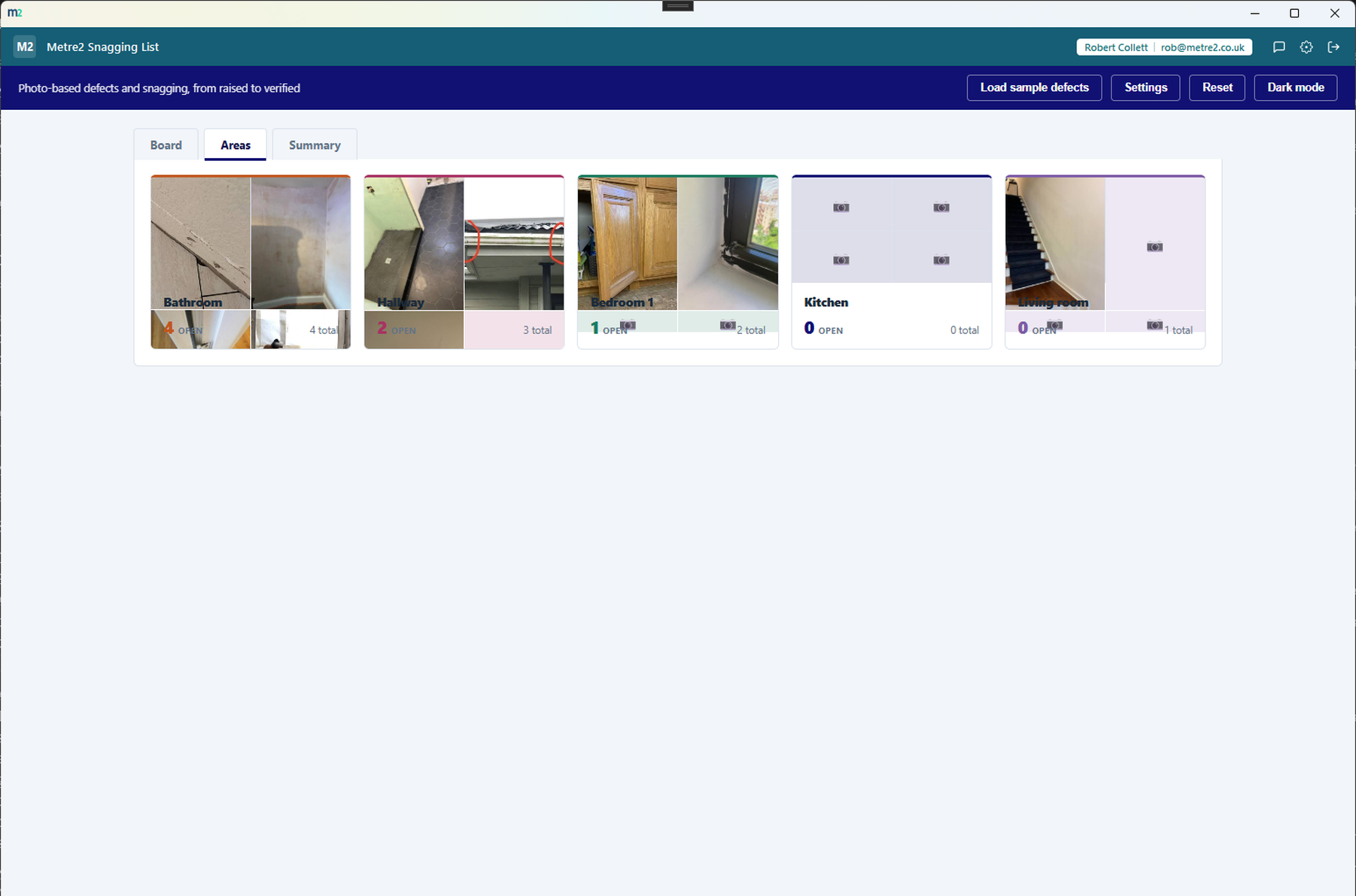
The Areas tab rolls every defect up by room or location - a colour-coded tile with an
open count and a small photo collage for each area, sorted so the worst areas surface
first.
The oldest open item, called out
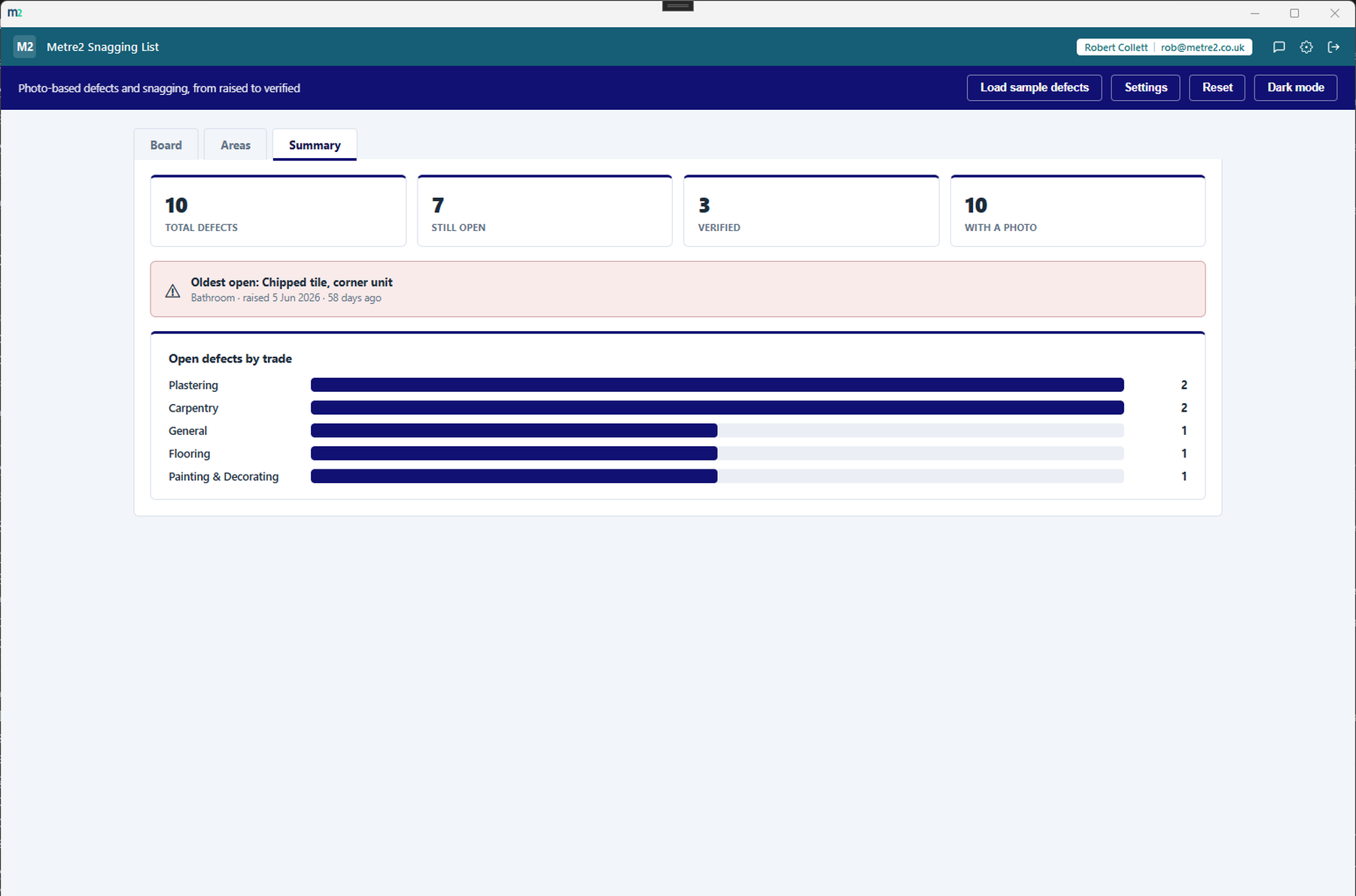
The Summary tab doesn't just count defects - it flags the single oldest open item by
name and age, so nothing quietly sits open for weeks unnoticed.
Which trade actually has the backlog
A breakdown of open defects by trade shows at a glance whether the bottleneck is
electrical, plumbing, plastering or somewhere else entirely.
Search, and filter by area, trade or severity
Search by title or notes, and filter the board by area, trade or severity to see
exactly the slice of the job you're working on right now.
Your own areas, coloured your way
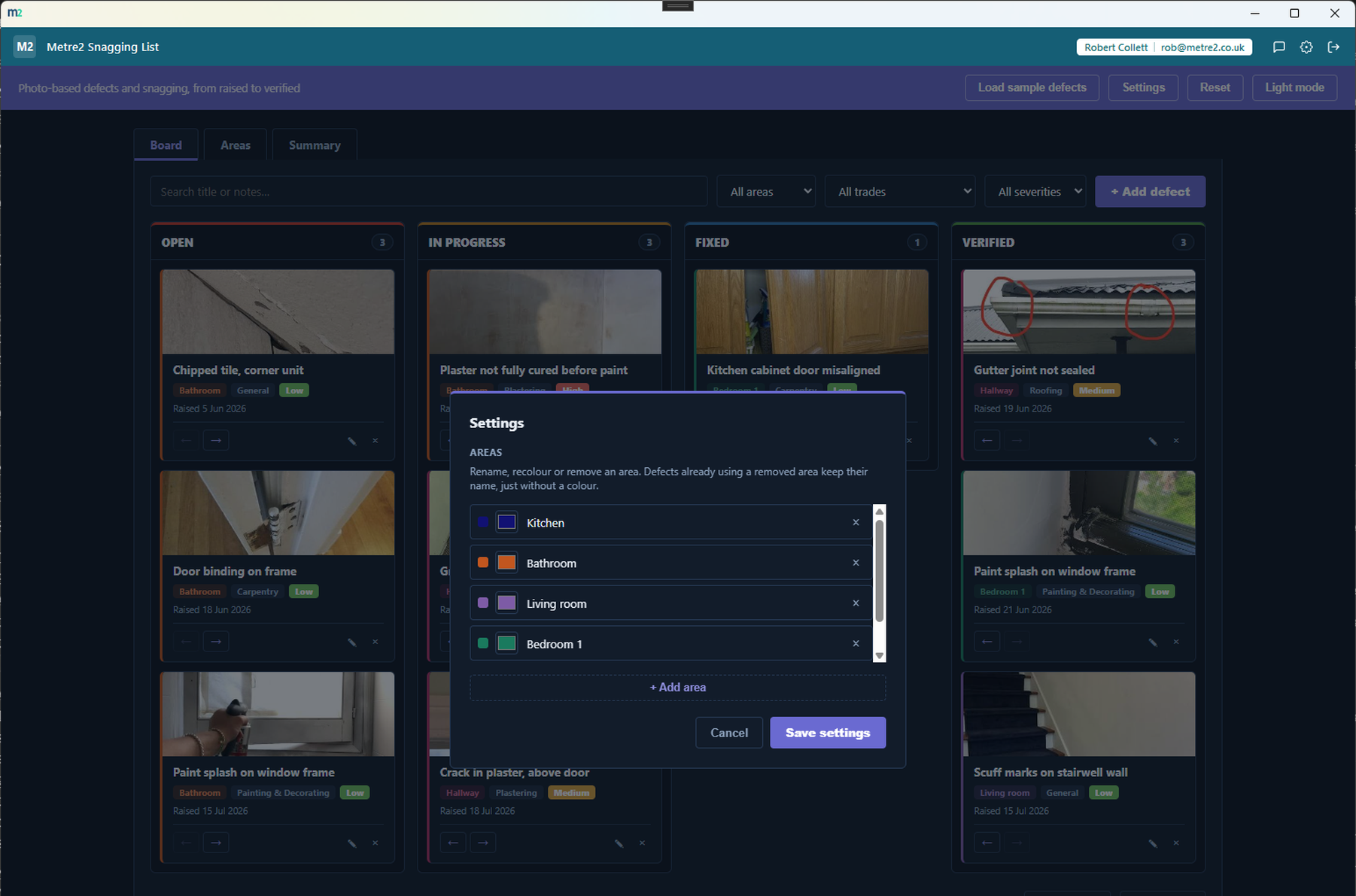
Add, rename, recolour or remove areas in Settings - each area's colour carries through
to its cards on the board and its tile on the Areas grid.
Your list is still there tomorrow
Defects and their photos persist between sessions, so the list builds into a real
running record - close the app and reopen it, and everything is right where you left
it.
Export to CSV or PDF
Export the whole list as a CSV file or a formatted PDF whenever you need it - for a
client, a contractor, or a handover pack.
Any trade or profession
The sample data leans toward construction snagging, but nothing in the app enforces
it - any handover-style job with defects to track and clear can use it.
Light/dark theme, and sample data
A light/dark toggle that remembers your choice, and a randomised sample defect list -
a fresh, realistic set every time - to explore the app before you start logging your
own.
How it compares to Fieldwire
Fieldwire is a well-known construction field-management platform with strong punch-list
(snagging) tools. It's built as a full project-management suite - here's how a focused,
one-off desktop board compares for a contractor who just needs defects tracked to close-out.
Feature
Snagging List
Fieldwire
Pricing model
£7.99 one-off after trial
From $39/user/month (Pro, billed annually)
Cost scales with team size
✕
✓
Works fully offline
✓
✓
Photo capture straight from the defect form
✓
✓
Drawing/plan markup tools
✕
✓
Open/In Progress/Fixed/Verified status board
✓
~
Full project-management suite (scheduling, docs, budgets)
✕
✓
One account across a whole app portfolio
✓
✕
Comparison based on Fieldwire's publicly listed pricing and features as of August 2026
(fieldwire.com, capterra.com, work-management.org) - pricing and features change over
time, so check fieldwire.com for current details. Fieldwire is a trademark of its
respective owner; this comparison is for informational purposes and isn't sponsored by or
affiliated with Fieldwire.
Snagging List, in practice
A closer look at the board, the Areas grid, the Summary tab, and dark mode with Settings open.
A status board, not a spreadsheet
Every room, with its open count and photos
The oldest open item, called out by name
Dark mode, and editable areas in Settings
Frequently asked questions
Do I need to install anything to use Snagging List?
You'll install Snagging List via the Microsoft Store, same as any other Keystone app, and it's free to try.
Does my Snagging List account work with Vector and Forma?
One account covers all of it: Snagging List, Vector, Forma and every other Keystone app share the same sign-in.
How does a defect move between Open, In Progress, Fixed and Verified?
Every defect card on the Board has forward and back arrows - click through to move it along, or back if it needs re-checking. No dragging required.
Is this only for construction handovers?
No - defect tracking with a photo is useful for any handover-style job, though the sample data leans toward construction snagging. Nothing in the app enforces it.
Where do my defects and photos go?
Defects and any attached photos persist on your device between sessions and in any file you export - nothing is uploaded anywhere. They don't currently sync across multiple devices.
Do photos take up a lot of space?
Photos are resized and compressed on your device before they're saved, so a defect log with plenty of photos stays reasonably light.
Can I organise defects by room or area?
Yes - the Areas tab rolls every defect up by room or location, each with its own colour and a small photo collage, so you can see at a glance where the open items are.
Can I edit a defect after logging it?
Yes - click the pencil icon on any card to open it in the same quick form used for adding a new defect, including swapping or removing its photo.