Tracks every quote you've sent to a prospect or client and flags which ones haven't been
followed up yet. An urgency queue sorts open quotes into Overdue, Due today, Due soon
and On track lanes, so you always know which one to chase next - instead of a quote
quietly going cold in an inbox somewhere.
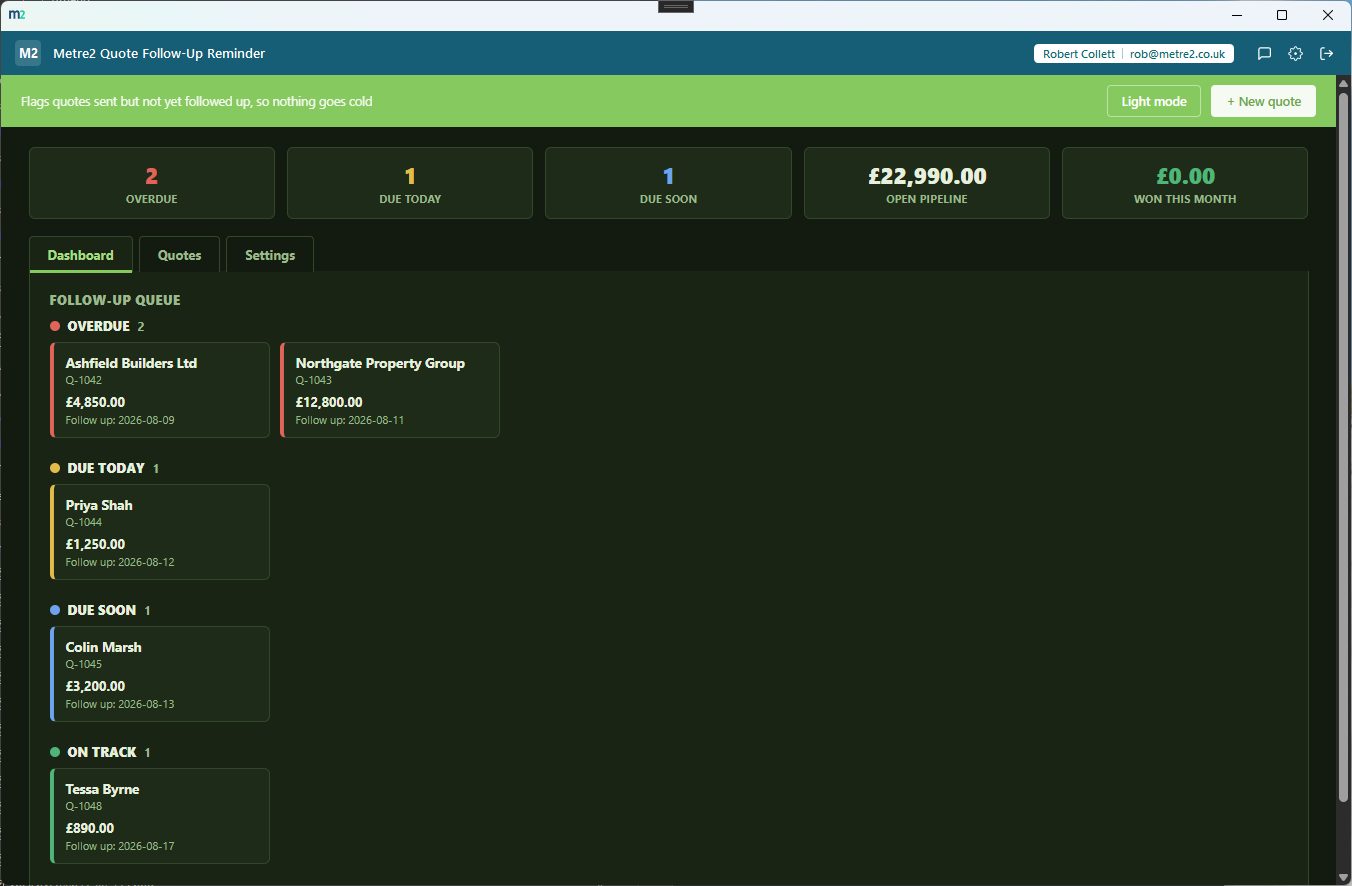
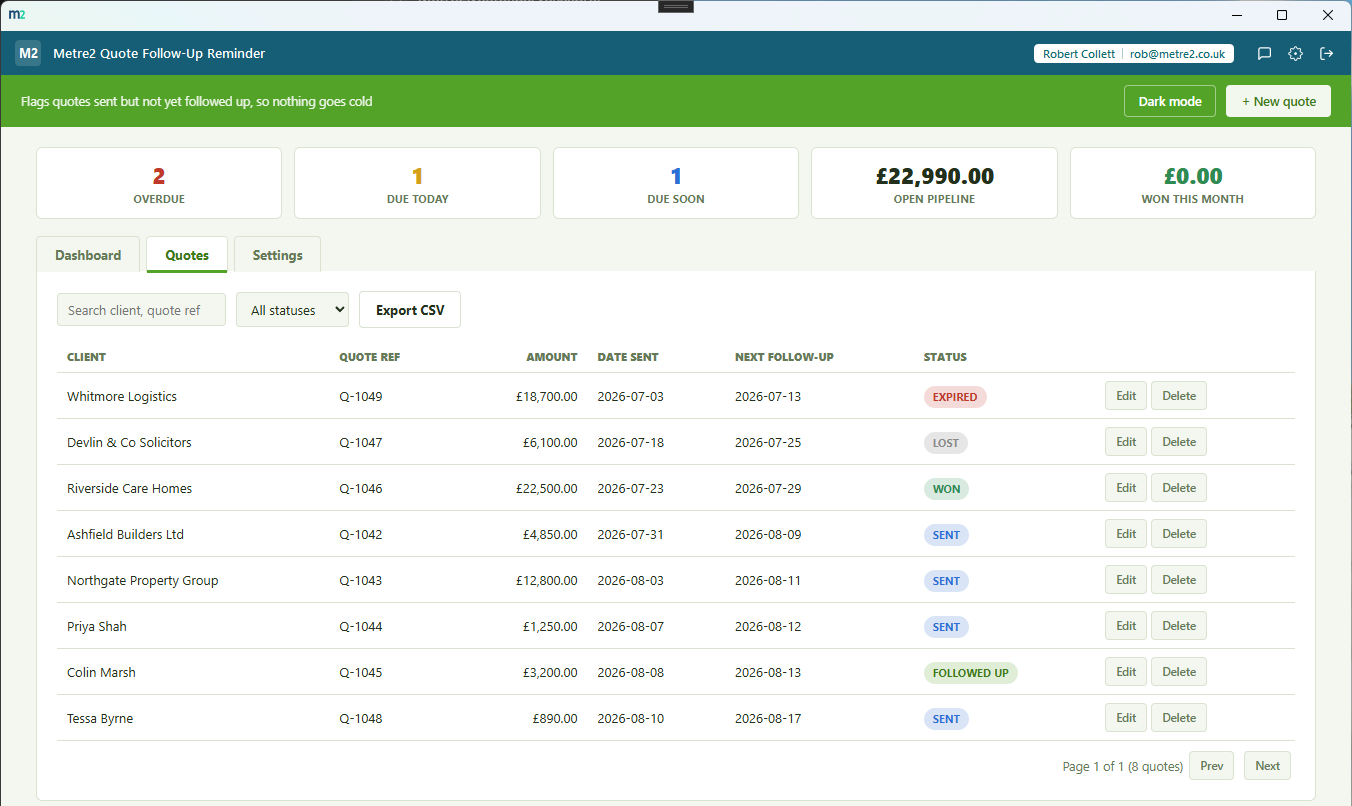
The Dashboard's urgency queue sorting open quotes by how soon they need chasing, and the Quotes tab listing every quote with search, sort and status filtering.
Dashboard - the urgency queue, sorted so the most pressing quote is always obvious
Quotes - every quote, searchable, sortable and filterable by status
An urgency queue, not just a list
Four lanes - Overdue, Due today, Due soon, On track - each a scrollable row of quote
cards sorted by follow-up date. One glance at the Dashboard tells you exactly which
quote needs chasing next.
Log a follow-up in one click
"Log follow-up now" records the date and a note, moves the quote to Followed up, and
automatically schedules the next follow-up date - no re-typing dates or digging
through an inbox to remember when you last chased someone.
A full follow-up history per quote
Every logged follow-up - date and note - stays attached to the quote, so you can see
exactly what was said and when, right up to the moment it's won, lost or expires.
Your own reminder window
Set how many days ahead each logged follow-up schedules the next one, and how many
days out counts as "due soon" - tune it to how fast-moving your sales cycle actually
is.
Open pipeline value at a glance
The stat strip totals every open quote's value into one pipeline figure, plus what's
been won this month - a running sense of how much is still live and how much has
actually landed.
Search, sort and filter the full list
Every quote's on the Quotes tab too, searchable by client, quote reference or notes,
sortable on any column, and filterable by status - for when you need the full list,
not just what's urgent.
Six currencies
GBP, EUR, USD, AUD, CAD and NZD symbols - quote tracking doesn't vary by country, so
you just pick the symbol that matches your own pricing.
Light/dark theme, and sample data
A light/dark toggle that remembers your choice, and "Load sample data" fills in a
realistic set of quotes across every status so you can see the queue working before
entering your own.
CSV export
Export the full quote list to CSV any time - for a backup, a spreadsheet pivot, or
handing a snapshot to someone else on the team.
Genuinely thin, on purpose
No quote builder, no invoicing, no full CRM - just the one job that matters once a
quote is out the door: making sure it gets chased.
Works entirely offline
Everything lives in local storage on your device - no account setup beyond your shared
Metre2 sign-in, no server, no internet connection required to use it day to day.
How it compares to a spreadsheet or a full CRM
Most small businesses either track sent quotes in a spreadsheet they forget to check, or
pay for a full CRM they don't need just to remember who to chase. Here's how a dedicated,
focused tracker compares.
Feature
Quote Follow-Up Reminder
A spreadsheet
Full CRM
Pricing model
£0.79 one-off after trial
Free (if you already have Excel/Sheets)
Per-user monthly subscription
Works fully offline
✓
✓ (local files)
✕ (cloud-hosted)
Urgency queue visual, not just a filtered list
✓
✕ (build a filter/formula yourself)
✓ (usually)
One-click follow-up logging with auto-scheduling
✓
✕ (update cells manually)
✓
Set-up time
Minutes
Minutes, but easy to forget to check
Days (pipelines, fields, permissions)
No account required to set up
✓
✓
✕
General comparison as of August 2026 - features and pricing vary by spreadsheet tool and
by CRM vendor. Not sponsored by or affiliated with any spreadsheet or CRM vendor.
Frequently asked questions
Do I need to install anything to use Quote Follow-Up Reminder?
It's a Windows desktop app. It is not yet available on the Microsoft Store - a Store listing is planned, but for now the app is built and ready ahead of submission.
How is this different from Quote Comparison or Quote-to-Invoice Converter?
Quote Comparison compares quotes you've RECEIVED from suppliers. Quote-to-Invoice Converter turns a quote you've WON into an invoice. Quote Follow-Up Reminder tracks quotes YOU'VE SENT to prospects and clients, and makes sure someone chases each one before it goes cold.
What is the urgency queue?
Four lanes on the Dashboard - Overdue, Due today, Due soon and On track - each showing the quotes sitting in that lane, sorted by follow-up date. Only open quotes (Sent or Followed up) appear; Won, Lost and Expired quotes are excluded once resolved.
How does logging a follow-up work?
Open a quote and click "Log follow-up now". It records the date and a note in the quote's history, moves its status to Followed up, and pushes the next follow-up date forward by your configured reminder window (7 days by default).
Can I set my own reminder window?
Yes - Settings lets you set the follow-up reminder window (how many days ahead each logged follow-up schedules the next one) and the "due soon" window used to populate that lane on the Dashboard.
Does it send emails or reminders on its own?
No - it's a tracking tool, not an email or notification sender. It surfaces which quotes need chasing when you open the app; you still make the call, send the email or send the message yourself, then log it here.
Where does my data go?
Nothing leaves your device: it runs entirely offline with no server behind it, and your data is stored locally between sessions. Cross-device sync isn't available yet.