Worldwide mortar mix calculator
Mortar Mix Calculator
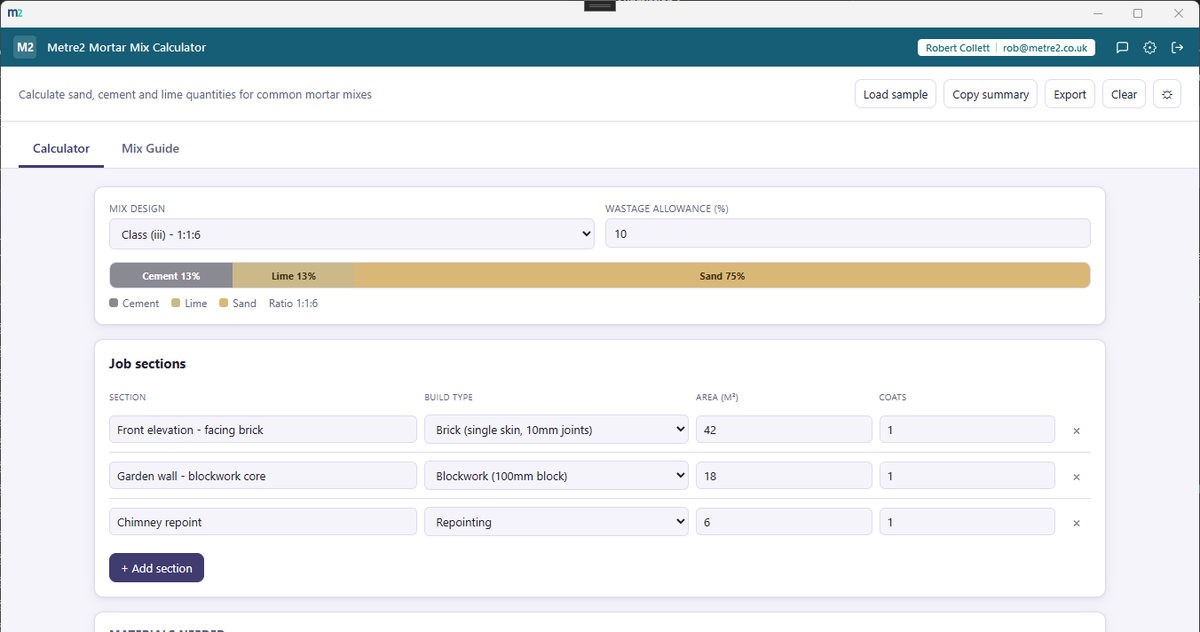
Calculate sand, cement and lime quantities for common mortar mixes - a recipe bar shows the mix ratio at a glance, and a bag grid shows exactly how many 25kg bags of cement and lime to order.
Worldwide mortar mix calculator
Calculate sand, cement and lime quantities for common mortar mixes - a recipe bar shows the mix ratio at a glance, and a bag grid shows exactly how many 25kg bags of cement and lime to order.
The Calculator tab's recipe bar and bag grid for a real job, and the Mix Guide reference tab.
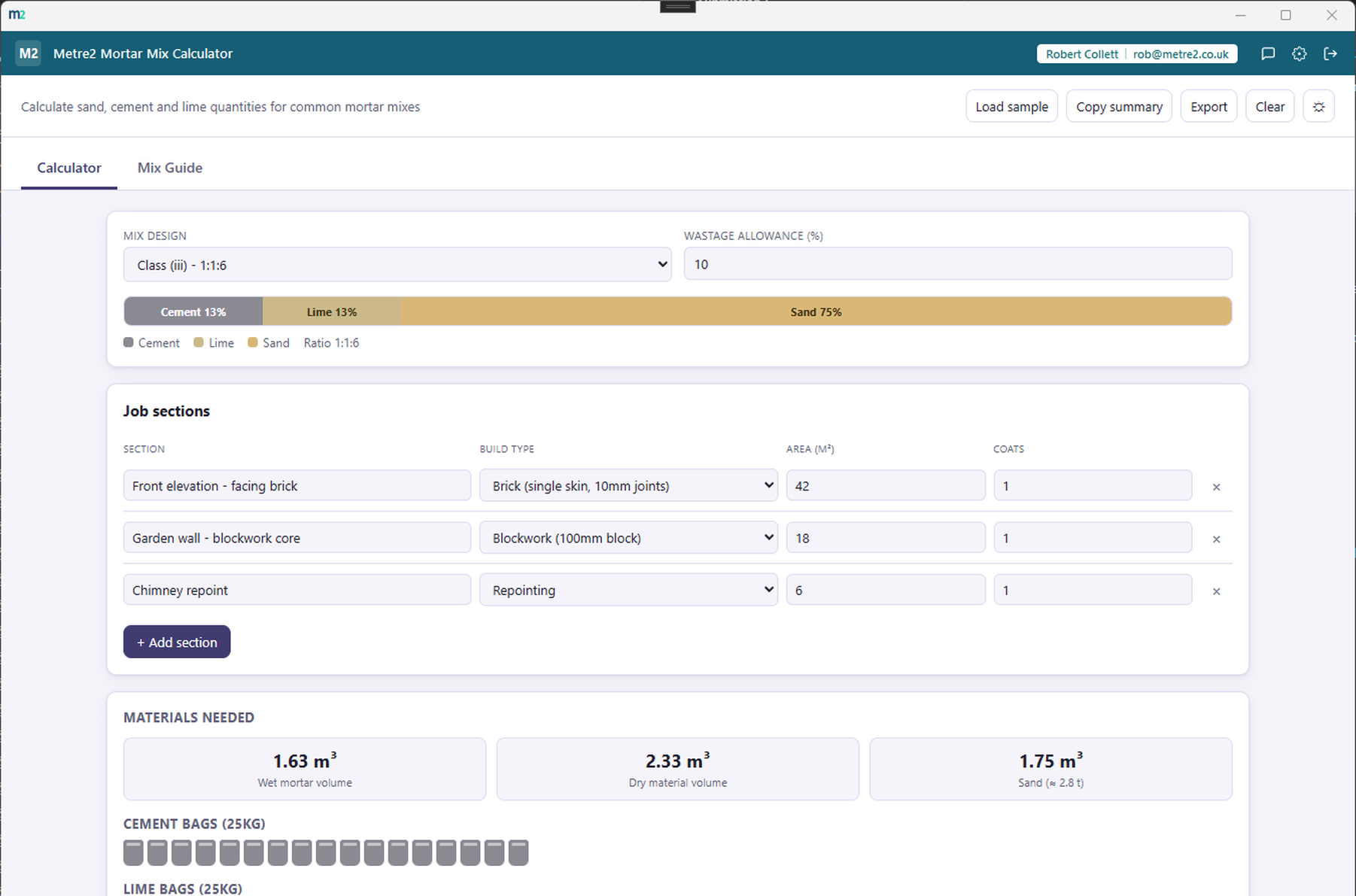
Calculator tab - recipe bar and bag grid for a real job
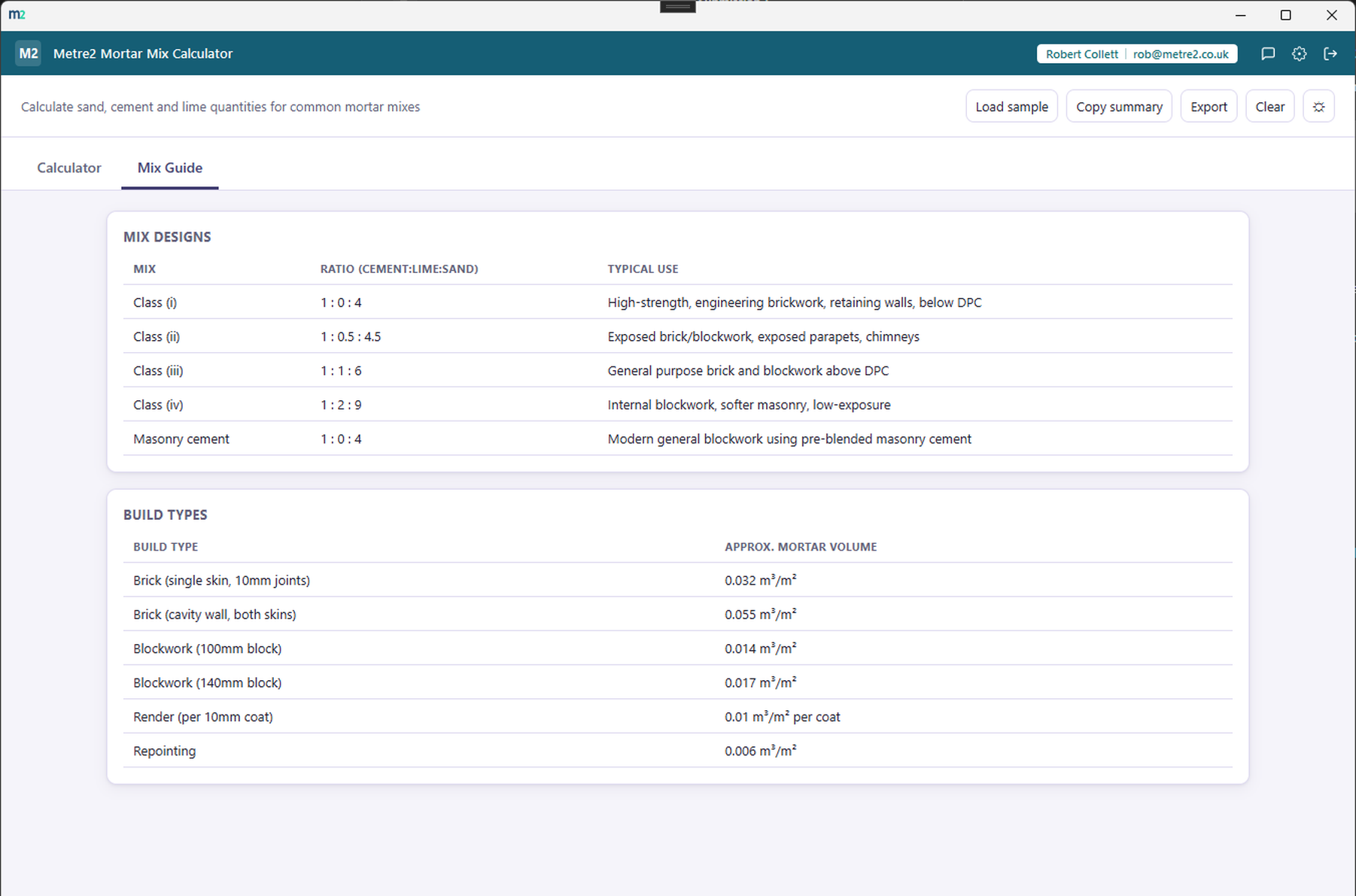
Mix Guide tab - standard mix classes and build types
A single proportional bar shows the selected mix design's cement, lime and sand split at a glance - change the mix and the bar updates instantly.
Class (i) through Class (iv), plus a masonry cement mix - each with its typical use, browsable any time in a dedicated Mix Guide tab.
Cement and lime totals convert straight to 25kg bag counts, shown as a bag grid - so you know exactly how many to order, not just a raw cubic metre figure.
Single-skin and cavity brickwork, two block thicknesses, render (with a coats field) and repointing - each with its own typical mortar volume rate.
Add every wall, section or repointing job separately with its own build type and area - totals roll up across the whole job automatically.
An editable wastage percentage covers offcuts and spillage. Copy a plain-text summary or export the whole job as a standalone HTML file. Light/dark theme remembers your choice.
Buildxact is a well-known cloud estimating and takeoff platform that includes material takeoff as one of many features. It's built for running a whole estimating pipeline, not a quick mix-and-bag-count check - here's how a focused, one-off tool compares.
| Feature | Mortar Mix Calculator | Buildxact |
|---|---|---|
| Pricing model | One-off purchase after a free trial | Subscription, from ~$169/month (Foundation plan) |
| Works fully offline | ✓ | ✕ |
| Instant standalone mortar mix/bag count | ✓ | ~ |
| Five standard mix designs across six build types, built in | ✓ | ✕ |
| Multiple job sections with a running bag-count total | ✓ | ✓ |
| Full job estimating, quoting & client management | ✕ | ✓ |
| Requires an account/cloud sign-in to use | ✕ | ✓ |
| Wastage allowance you control | ✓ | ✓ |
Comparison based on Buildxact's publicly listed pricing and features as of August 2026 (buildxact.com, softwareadvice.com, capterra.com) - pricing and features change over time, so check buildxact.com for current details. Buildxact is a trademark of its respective owner; this comparison is for informational purposes and isn't sponsored by or affiliated with Buildxact.
Three different jobs sharing one Class (iii) 1:1:6 mix, added as separate sections so each contributes its own mortar rate.
The three build types use different mortar rates per square metre (brickwork needs far more than repointing), which is why they are entered as separate rows rather than one lump of area. Pick Class (ii) or masonry cement instead and the lime line disappears or changes - the bag icons redraw as you go. Open the browser edition to try it with your own figures.
No - use it straight from your browser, on a phone, tablet or PC, with no sign-up. It works offline once it has loaded, and you can add it to your home screen or desktop like an app. There is also a Windows desktop version in the Microsoft Store if you prefer an installed app.
One account covers all of it: Mortar Mix Calculator, Vector, Forma and every other Keystone app share the same sign-in.
No - it's an approximate sizing guide based on commonly-used mortar volume rates and standard mix ratios, not a guarantee of exact quantities. Actual requirements vary by brick or block size, joint width, workmanship and wastage on site - always check against your specification before ordering materials.
Five standard mortar mix designs by volume - Class (i) 1:0:4 through Class (iv) 1:2:9, plus a masonry cement 1:4 mix - each with its typical use, browsable in the Mix Guide tab.