Estimates how much to set aside for tax from each payment - any freelancer or sole
trader. A set-aside thermometer tracks how much you've actually moved to savings against
how much you owe this tax year, a checkbox ledger lets you tick off each payment as you
move the money, and a client cloud shows where your income is really coming from. A
dedicated Charts tab adds a live quick calculator and four colourful charts, complete
with a confetti celebration when you hit 100% saved. Export the lot as CSV or PDF
whenever you need it.
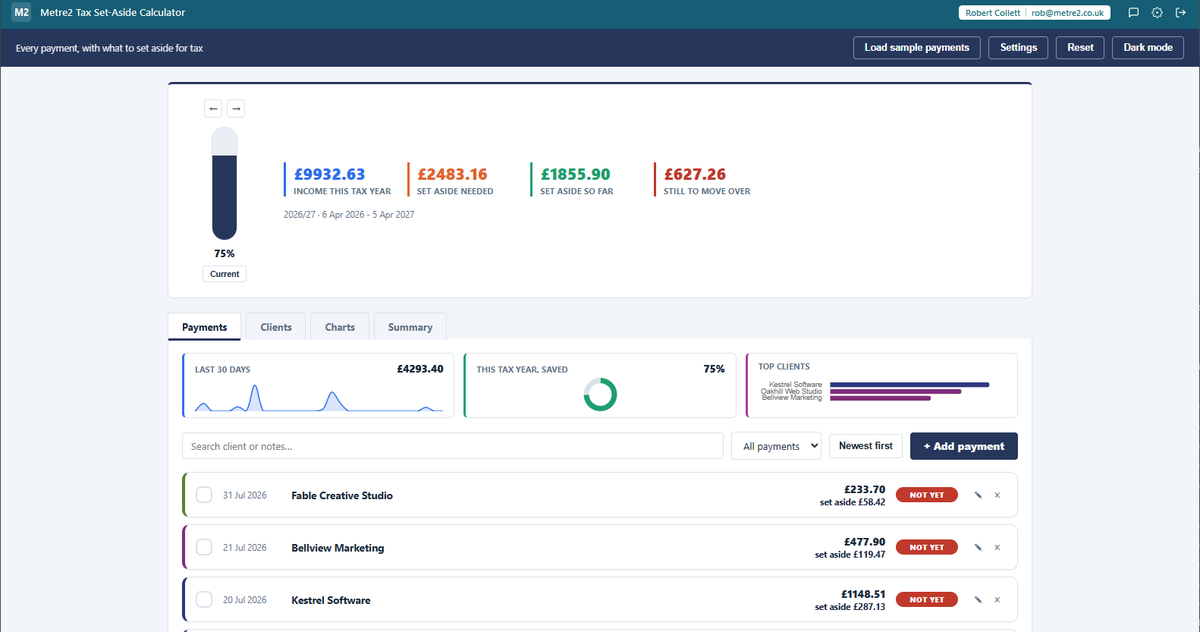
A vertical set-aside thermometer sits above everything else - how much you've actually
moved to savings against how much you owe this tax year. Step back through past tax
years with prev/next navigation.
Tick each payment off as you move the money
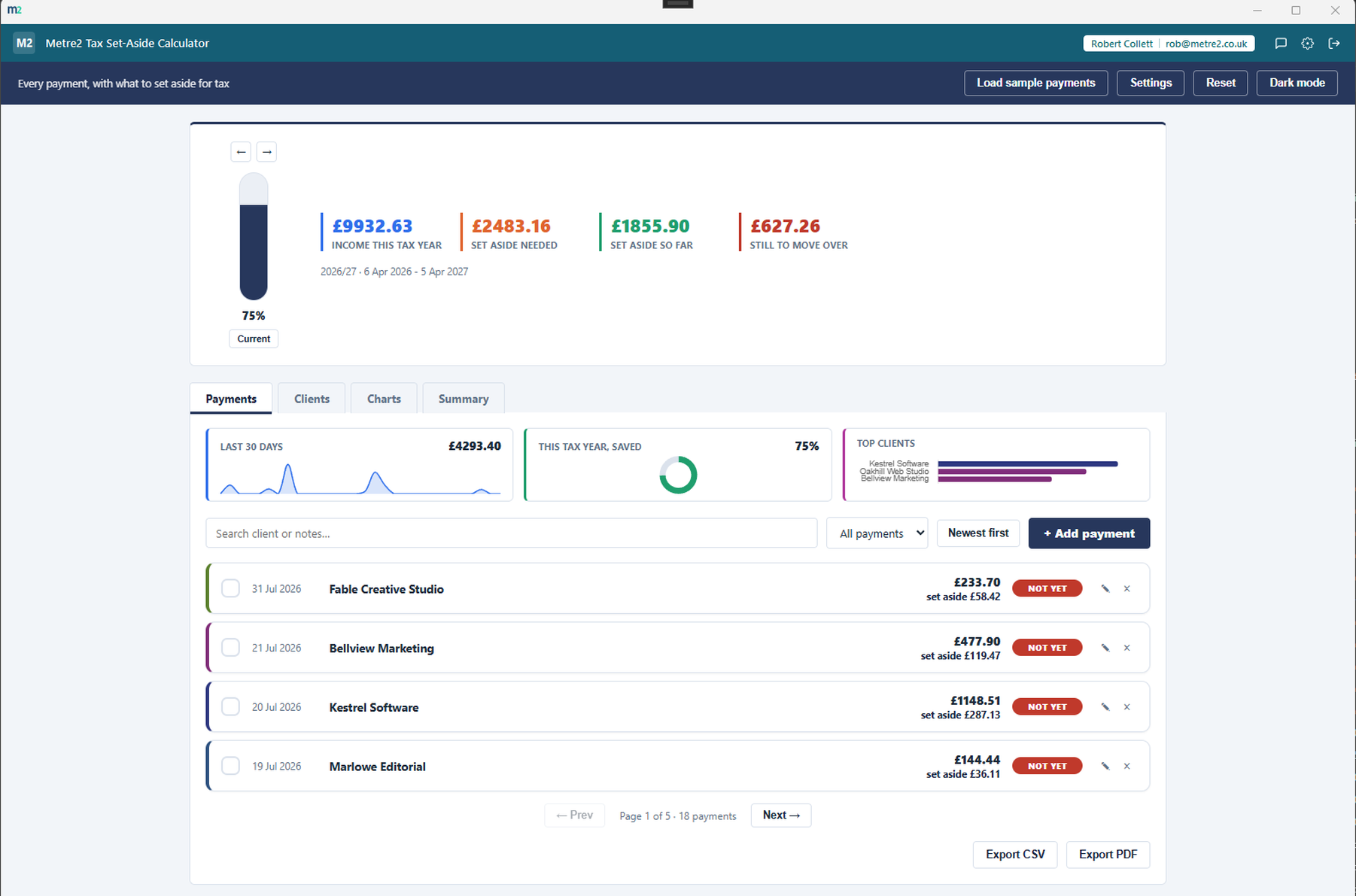
Every payment is a row with its own checkbox - tap it once you've actually transferred
that payment's set-aside amount to savings, and the row tints green so you can see
what's still outstanding at a glance. Each row's left edge is coloured to that client,
matching their pill on the Clients tab.
Three small charts, right on the front screen
The Payments tab opens with a mini-chart strip - a 30-day income sparkline, a set-aside
progress ring for the current tax year, and your top clients - so you get a glance at
the numbers before you've even scrolled to the ledger.
See where your income actually comes from
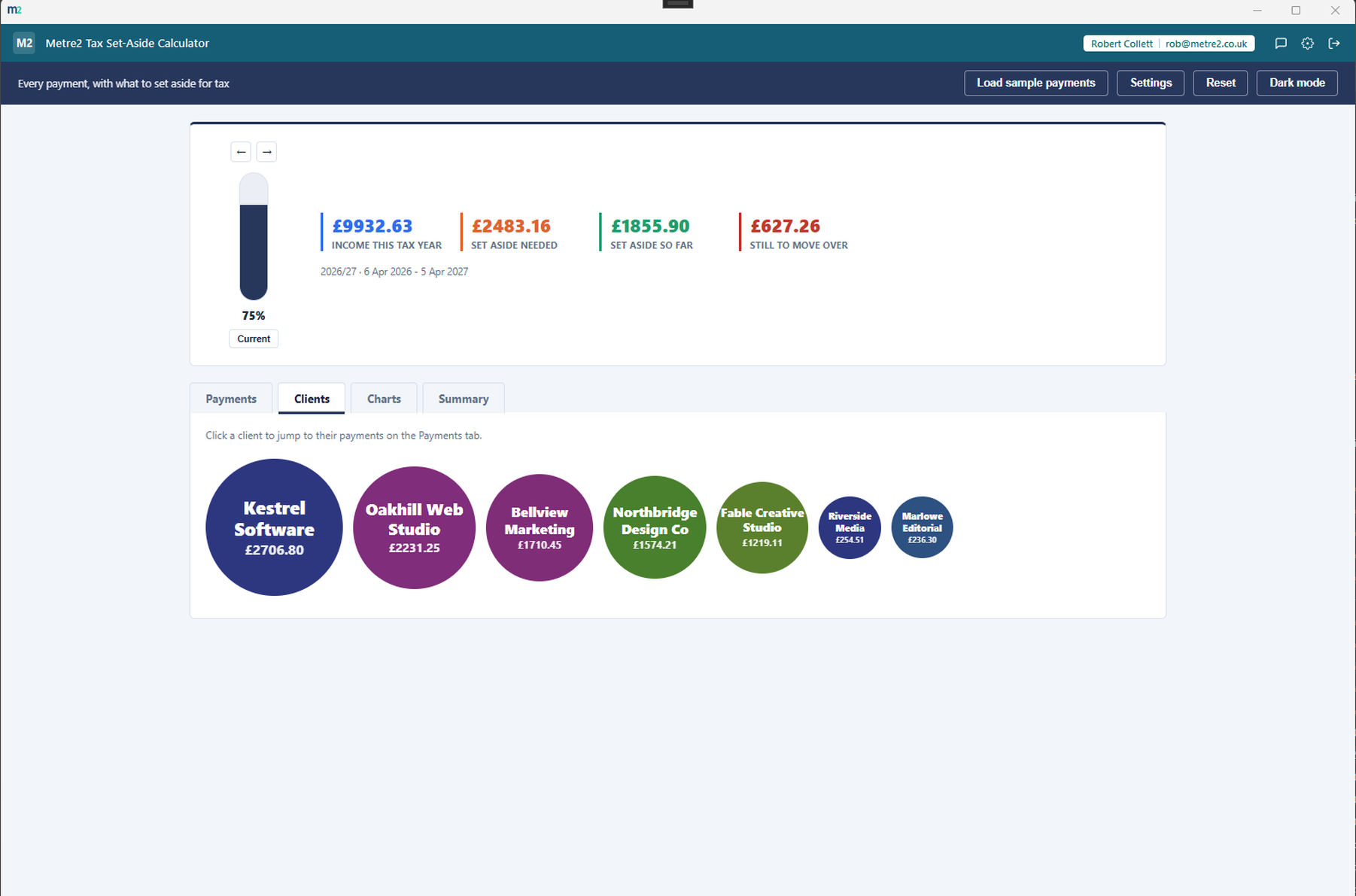
The Clients tab is a cloud of pills, sized by how much each client has paid you - the
bigger the pill, the bigger the share of your income, at a glance. Click a pill to jump
straight to that client's payments.
A whole tab of charts - and a live calculator
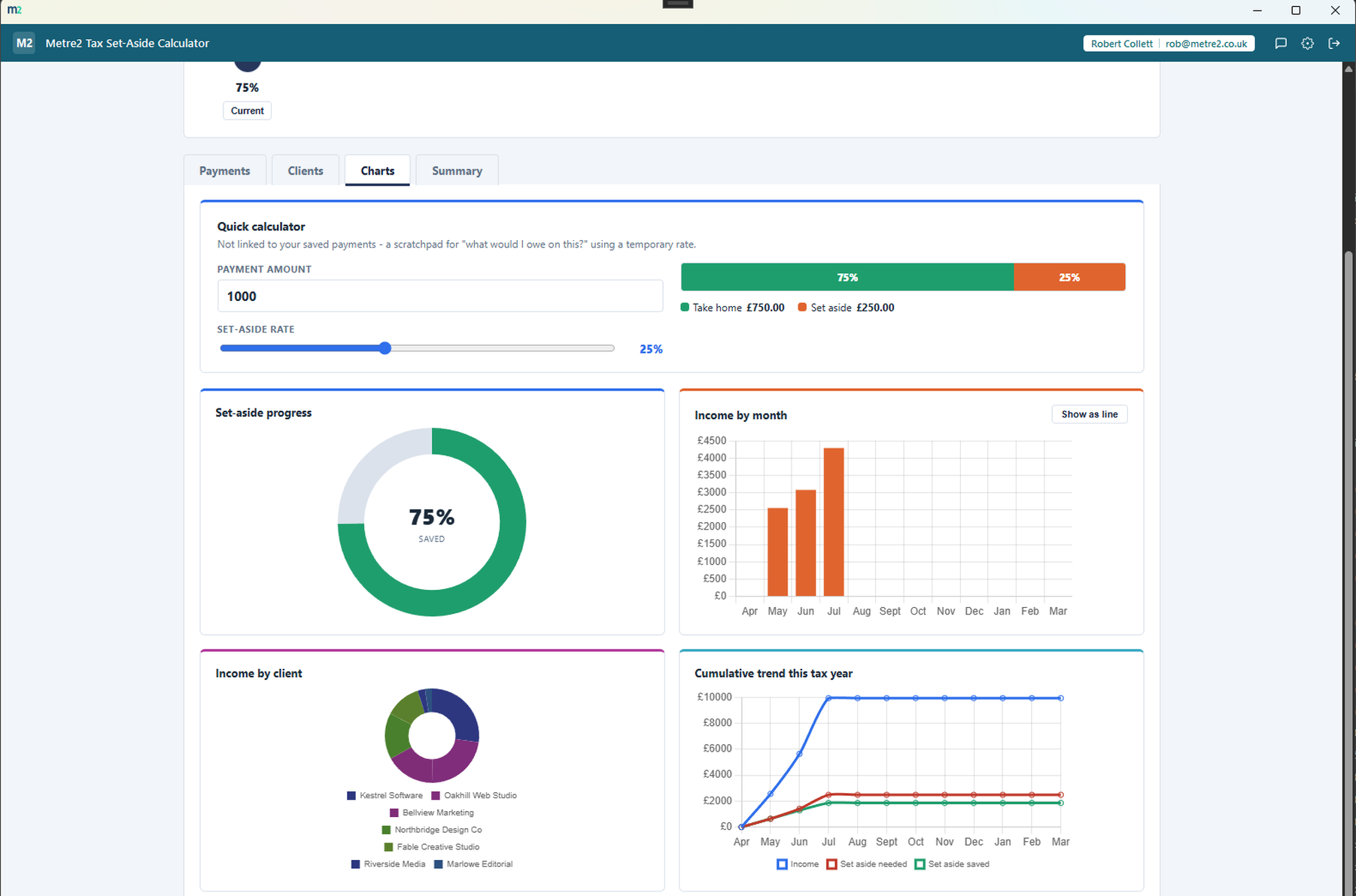
The Charts tab opens with a live quick calculator - punch in an amount and drag a rate
slider to see an instant take-home/set-aside split, no effect on your saved data. Below
it, four charts for the tax year you're viewing: a set-aside progress ring (complete
one and it bursts into a one-off confetti celebration), income by month with a
bar/line toggle, income by client in the same colours as your client cloud, and a
cumulative trend line across the year.
Every tax year, totalled
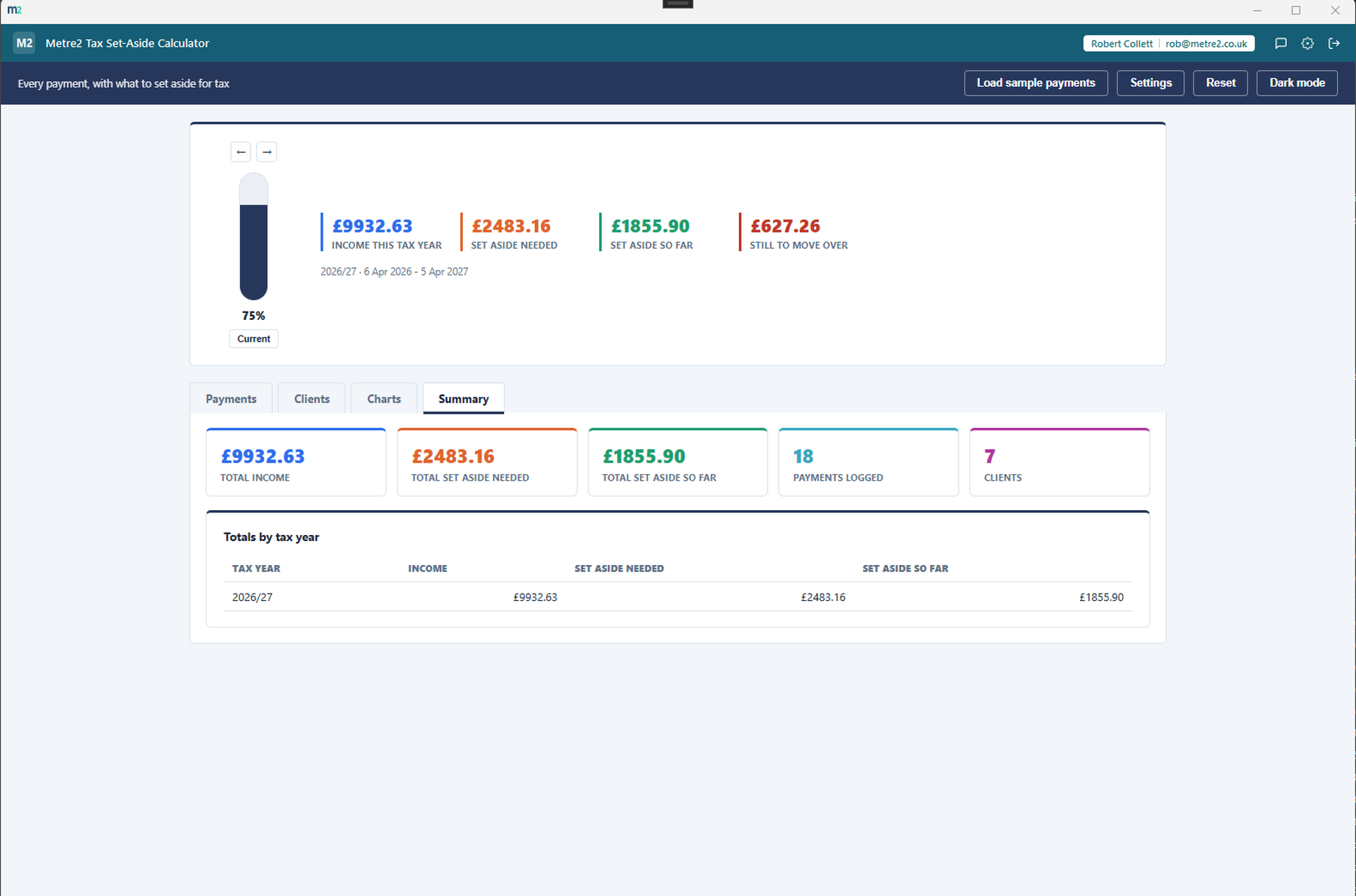
The Summary tab rolls up total income, total set aside needed and total actually
saved into colour-coded stat tiles, alongside a table of totals for every tax year
you've logged payments in.
Search, and filter by status
Search by client or notes, and filter the ledger to just what's already set aside or
what's still pending, and flip between newest-first and oldest-first.
Your own rate, your own currency
The set-aside percentage is a single number you set in Settings - 25% by default, a
simplification rather than a real tax calculation, adjustable to match your own
situation.
Your ledger is still there tomorrow
Payments persist between sessions, so the ledger builds into a real running record -
close the app and reopen it, and everything you've logged is right where you left it.
Export to CSV or PDF
Export the whole ledger as a CSV file or a formatted PDF whenever you need it - for
your own records or an accountant.
Any freelancer or sole trader
Not construction-specific - a genuinely common need for anyone self-employed, whatever
the trade or profession.
Light/dark theme, and sample data
A light/dark toggle that remembers your choice, and a randomised sample payment ledger
- a fresh, realistic set of payments every time - to explore the app before you start
logging your own.
How it compares to FreeAgent
FreeAgent is a well-known UK cloud accounting platform built for sole traders and
freelancers, with a subscription price and a Self Assessment/MTD filing engine behind it -
here's how a focused, one-off set-aside tracker compares for someone who just wants to
see what to save for tax.
Feature
Tax Set-Aside Calculator
FreeAgent
Pricing model
£6.99 one-off after trial
£19/month (often discounted; free with a qualifying NatWest Group business account)
Works fully offline
✓
✕
Full accounting suite - invoicing, bank feeds, VAT
✕
✓
Real-time HMRC-calibrated tax estimate
~
✓
Submit Self Assessment / MTD returns to HMRC
✕
✓
Per-payment set-aside checklist and thermometer
✓
~
Multi-year income and set-aside charts
✓
✓
One account across a whole app portfolio
✓
✕
Comparison based on FreeAgent's publicly listed pricing and features as of August 2026
(freeagent.com, taptax.co.uk) - pricing and features change over time, so check
freeagent.com for current details. FreeAgent is a trademark of its respective owner;
this comparison is for informational purposes and isn't sponsored by or affiliated with
FreeAgent.
Tax Set-Aside Calculator, in practice
A closer look at the mini-chart strip and ledger, the client cloud, the Charts tab, and the Summary tab.
Small charts up top, a coloured ledger below
Click a client to filter straight to their payments
A live calculator, and four charts for the tax year
Every tax year, totalled
Frequently asked questions
Do I need to install anything to use Tax Set-Aside Calculator?
Yes - Tax Set-Aside Calculator runs as a Windows desktop app, and you can try it for free from the Microsoft Store.
Does my Tax Set-Aside Calculator account work with Vector and Forma?
Yes - there's a single Metre2 account behind Tax Set-Aside Calculator, Vector, Forma and the rest of Keystone. Sign in once, use it everywhere.
Is this a real tax calculation?
No - it's a simplification. Every payment is set-aside at one flat percentage you choose in Settings (25% by default), not a real tax return calculation. It's meant to build the habit of setting money aside as it comes in, not to replace an accountant.
Is this only for construction trades?
No - this is a generic freelancer and sole-trader tool, not tied to any one industry. The sample data uses generic client names rather than construction-specific ones.
Where do my payments go?
Payments persist on your device between sessions and in any file you export - nothing is uploaded anywhere. They don't currently sync across multiple devices.
What does the checkbox on each payment actually do?
It marks whether you've actually moved that payment's set-aside amount into a savings account. It's a manual toggle - the app doesn't move money for you - but it's what drives the thermometer and the "still to move over" figure.
How is the set-aside rate calculated?
It's a single flat percentage of each payment's amount, editable in Settings. There's no tax-band logic or allowance calculation - it's deliberately simple, a rough working figure rather than a precise one.
Can I edit a payment after logging it?
Yes - click the pencil icon on any row to open it in the same quick form used for adding a new payment.
Does the Charts tab quick calculator change my saved payments?
No - it's a scratchpad. The amount and rate slider on the quick calculator only affect what's shown on that card; your logged payments and Settings rate are untouched.